

To stop Haikyu!! Fly High crashing on Android or freezing on a black screen at launch, verify your device runs Android 9 or higher, update Android System WebView and Google Chrome from the Google Play Store, and force stop the app to clear corrupted cache files.
Android boot failures usually point to system-level component conflicts or corrupted local data rather than an issue with your account. Following troubleshooting steps in order of least disruptive to most intensive allows you to isolate the root cause without unneeded reinstallation.
HAIKYU!! FLY HIGH Global Top Up
1. Confirm Android OS Version Compatibility
Before adjusting system services, check whether your hardware supports the app build. According to the technical requirements documented on Uptodown, Haikyu!! Fly High requires Android 9 or higher to run.
Devices operating on Android 8.1 Oreo or older builds cannot process client instructions correctly. This leads to immediate crashes before the opening splash video or a persistent black screen after the initial tap. If your phone cannot upgrade past Android 8, the client will fail to boot.
2. Update Android System WebView and Google Chrome
An unpatched web rendering engine frequently triggers sudden crashes. Android relies on Android System WebView and Google Chrome to authenticate accounts, display notice boards, and load web-based in-game frames.
Google documented that outdated builds of Android System WebView and Google Chrome trigger instant crash loops across installed applications, releasing a patch on March 23, 2021 (Yahoo Help). When these core services fall out of date, Haikyu!! Fly High will drop straight back to the home launcher.
Follow these steps to repair the system components:
- Open the Google Play Store.
- Search for Android System WebView and tap Update if a new version is available.
- Search for Google Chrome and install any pending updates.
- Restart your device.
If the startup crash persists after updating both applications, Yahoo Help recommends opening your device settings, finding the Google Play Store in your app list, and clearing its application storage data.
3. Clear App Cache and Reset Corrupt Temporary Data
If the operating system and WebView components are up to date, a corrupted patch file or broken local authentication token may be stalling the game during the title screen handshake.
Clearing temporary files forces the OS to rebuild cache directories on launch. The standard reset sequence documented on the Wyze Community Forum clears corrupted local states without removing user credentials:
- Locate the Haikyu!! Fly High icon on your home screen or app drawer.
- Tap and hold the icon, then select App info (or tap the "i" symbol).
- Tap Force stop and confirm by selecting OK.
- Select Storage & cache.
- Tap Clear cache to purge stale run files.
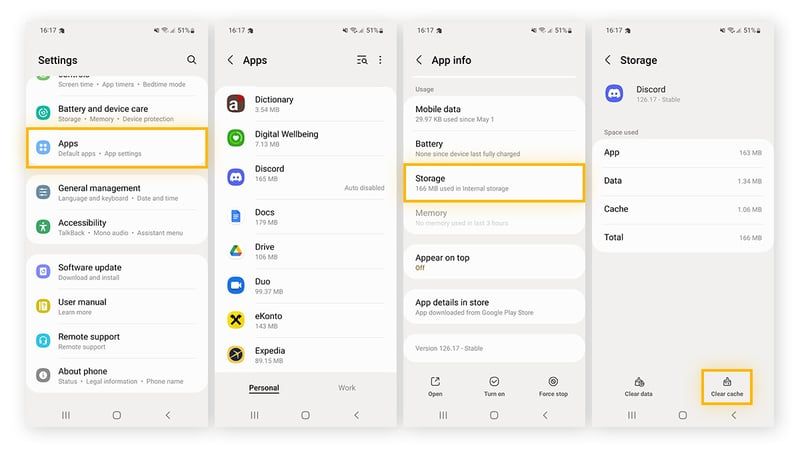
Relaunch the game. If the client remains stuck on a black screen or freezes at the title screen, return to the same menu and select Clear storage (or Clear data). This deletes broken configuration files and forces the game to perform a fresh server handshake and profile retrieval on boot.
Next Steps After Resolving Boot Crashes
Once the game passes the title menu and connects to the servers, link your profile to a permanent third-party login method to prevent progress loss during future updates or cache purges.
On Global servers outside SEA and the US, you can then proceed with team building. To purchase Diamonds and premium packs for gacha pulls, player scouting, costumes, or roster upgrades, visit the HAIKYU!! FLY HIGH Global Top Up page directly.

Community
Comments