

The fastest way to farm Razer Silver on a Razer Gold Thailand profile combines three free software routines with wallet reloads: claiming 10 daily Silver in the Razer Cortex Games mobile app, playing featured desktop titles in Razer Cortex PC for 5 Silver per minute (doubled to 10 per minute on Saturdays and Sundays), launching mobile sessions for at least 3 minutes, and collecting the base loyalty rate of 50 Silver per equivalent baseline spend unit across supported catalog purchases.

Razer Gold Thailand (THB)
Daily mobile checklist: Cortex Games Android check-ins
The mobile leg of the farming route runs entirely through the Razer Cortex Games Android application. Logging into your Razer ID grants access to the Daily Loot mechanic under the rewards menu.
Collecting your daily check-in takes seconds. The app dispenses 10 Razer Silver on standard days. Milestone logins grant escalated rewards: Day 10 yields 25 Silver, Day 50 provides 50 Silver, and Day 100 gives 100 Silver (Razer Cortex Games Guide).
Day 1–9:   10 Silver daily
Day 10:    25 Silver milestone
Day 11–49: 10 Silver daily
Day 50:    50 Silver milestone
Day 51–99: 10 Silver daily
Day 100:   100 Silver milestone
Missing an active day carries no penalty. Unlike traditional gacha or gaming check-ins, the milestone counter does not reset back to zero if your login pattern breaks. The progress tracker remains cumulative, so you pick up exactly where you left off.
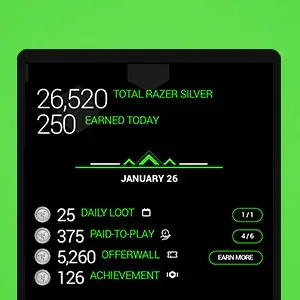
Mobile Paid to Play requires launching featured titles directly from the Cortex PLAY TO EARN GAMES library rather than an Android home screen shortcut. Cortex verifies active sessions via operating system notifications on launch and close. Sessions shorter than 3 consecutive minutes yield zero points; keep each game open past that 3-minute threshold to register credit.
PC farming: Paid to Play rates and weekend multipliers
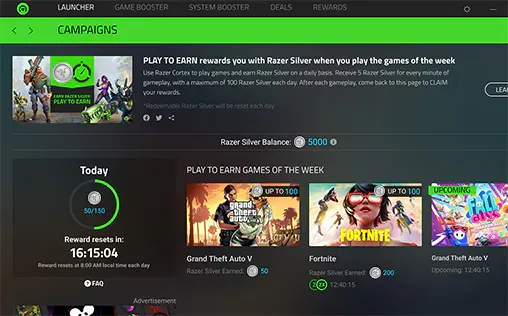
Desktop farming yields the largest daily point accumulation outside of direct purchases. Razer Cortex PC distributes 5 Razer Silver for every minute of active gameplay after completing the first full minute of play on supported weekly titles (Razer Paid to Play PC).
Weekend sessions double the yield. On Saturdays and Sundays, the software applies a 2X multiplier, delivering 10 Razer Silver per minute after the initial minute. Daily earning limits depend on the specific active campaign and title rotation set by Razer.
Weekday Rate: 5 Razer Silver per minute (starts after minute 1)
Weekend Rate: 10 Razer Silver per minute (2X multiplier after minute 1)
Point delivery on desktop is not automated. Exiting a featured title does not deposit points straight into your balance. Once your session ends, open Razer Cortex PC, head to the Rewards section, and enter the PLAY TO EARN screen. You must select CLAIM to transfer the session earnings into your linked wallet. A Windows desktop pop-up notification appears to confirm the balance deposit.
Razer Gold spend multipliers and regional rules for Thailand
Beyond free software routines, spending wallet funds yields uncapped points. New Razer ID profiles receive a one-time sign-up bonus of 1,000 Razer Silver upon initial wallet setup (Razer Cortex Games Earn Silver).
Ongoing purchases across games and digital content grant a base rate of 50 Razer Silver per standard spend unit equivalent to one US dollar (Lotkeys Razer Gold Guide). Points credit against verified game transactions processed through your balance.
Thailand accounts are strictly region-locked and denominated in Thai Baht (THB). Loading funds requires regional alignment: foreign PINs trigger immediate redemption errors at checkout. Maintain local wallet balances through verified Razer Gold Thailand (THB) reloads to avoid currency conversion snags.
Razer strictly prohibits routing connections through anonymizing proxies or VPN tools. Violating proxy restrictions risks 2-step verification failures and permanent balance termination (Razer Silver Rewards Terms and Conditions). Always connect from your domestic Thai IP address.
PIN length varies by distributor. Lotkeys identifies digital pins as typically using 20 digits, Baxity documents 16 digits, and MyGiftCardSupply lists 14 digits. When redeeming a card, enter the exact numeric string from your receipt without adding regional prefix codes.
Daily and weekly farming route order
Running this route systematically prevents wasted time on uncredited game sessions.
| Activity | Platform | Requirement | Payout Rate | Claim Method |
|---|---|---|---|---|
| Daily Loot | Android App | Log in via Razer ID | 10 Silver base (milestones: 25, 50, 100) | Instant via app screen |
| Mobile Session | Android App | Launch from Cortex; 3+ minutes continuous | Campaign-dependent points | Push notification confirmation |
| PC Session | Desktop Client | Launch featured game from Cortex | 5 Silver/min (10 Silver/min on weekends) | Manual click on CLAIM button |
| Wallet Spending | Razer Gold | Check out across catalog titles | 50 Silver per equivalent spend unit | Credited to transaction history |
Follow this sequence every day:
- Open Razer Cortex Games on Android while connected to local mobile data or domestic home internet.
- Tap the Daily Loot icon to bank the daily 10 Silver reward and advance the milestone counter.
- Launch a featured mobile title directly through the Cortex Games library and keep the session active for at least 3 minutes.
- Boot your PC, launch Razer Cortex, select a weekly featured desktop title from the PLAY TO EARN panel, and play through your target session.
- Exit the PC game, return to the Rewards tab inside Razer Cortex PC, and click CLAIM to pull your Silver into your wallet.
Reserve game purchases and top-ups for active weekend multiplier events or targeted catalog promotions to compound the standard base rate of 50 Silver per unit spent.
Razer Silver expiration rules and management
Farmed Silver does not sit in your wallet forever. Third-party guides frequently claim that points expire exactly 365 days after the precise minute earned. Official program rules work on a calendar-month schedule: points remain valid for twelve calendar months starting from the end of the month in which Razer awarded them (Razer Silver Rewards Terms and Conditions).
Points earned throughout any day in September expire on the final day of September the following year. Points cannot be transferred between accounts, merged across different regional profiles, converted to cash, or refunded once expired. Track older balances through your account transaction ledger and clear them on hardware vouchers, digital codes, or game keys before the final day of their expiration month.
Frequently asked questions
Do I lose my Daily Loot streak on Cortex Games if I skip a day?
No. Razer Cortex Games tracks logins on a cumulative basis. If you skip one or several days, your progress counter toward the 25 Silver reward on Day 10, 50 Silver on Day 50, and 100 Silver on Day 100 remains preserved (Razer Cortex Games Guide).
Why was Razer Silver not credited immediately after closing my PC game?
Desktop sessions require an explicit claim step. You must reopen Razer Cortex PC, go to the PLAY TO EARN screen under the Rewards tab, and click the CLAIM button. The software triggers a Windows pop-up confirming the manual transfer into your wallet (Razer Paid to Play PC).
Can I reload a Global USD or foreign Razer Gold PIN into my Thailand THB wallet to farm Silver?
No. Accounts are region-locked. Entering a foreign PIN into a Thai Baht wallet results in a system reload error. Using a proxy or VPN to bypass local storefronts violates terms of service and can cause security lockouts or profile termination (Razer Silver Rewards Terms and Conditions).

Community
Comments