

Learn how to switch server in Harry Potter Magic Awakened on PC and mobile, find missing characters, and understand server lock rules without losing data.
Opening Harry Potter: Magic Awakened to an empty character screen feels like an account wipe. You tap through the login prompt expecting your high-level deck and custom robes, only to face Ollivanders wand fitting or the Great Hall sorting ceremony all over again.
Relax. Your character profile is almost certainly intact. In most cases, the game simply defaulted to the wrong server shard after an update or clean reinstall. Character progression in this CCG is strictly server-bound; pick the wrong shard, and your account looks erased.
Here is how server selection works on mobile, emulators, and PC, plus how to pull up your original witch or wizard.
Harry Potter: Magic Awakened Jewels
- -70%
Harry Potter: Magic Awakened(哈利波特: 魔法觉醒)60 Jewels
Buy NowUSD 0.90
USD 1.53
- -70%
Harry Potter: Magic Awakened(哈利波特: 魔法觉醒)300 Jewels
Buy NowUSD 4.56
USD 7.76
- -70%
Harry Potter: Magic Awakened(哈利波特: 魔法觉醒)680 + 70 Jewels
Buy NowUSD 9.15
USD 15.55
- -70%
Harry Potter: Magic Awakened(哈利波特: 魔法觉醒)980 + 165 Jewels
Buy NowUSD 13.73
USD 23.34
- -70%
Harry Potter: Magic Awakened(哈利波特: 魔法觉醒)1280 + 270 Jewels
Buy NowUSD 18.31
USD 31.12
- -70%
Harry Potter: Magic Awakened(哈利波特: 魔法觉醒)1980 + 380 Jewels
Buy NowUSD 27.30
USD 46.42
- -70%
Harry Potter: Magic Awakened(哈利波特: 魔法觉醒)3280 + 780 Jewels
Buy NowUSD 45.63
USD 77.57
- -70%
Harry Potter: Magic Awakened(哈利波特: 魔法觉醒)6480+ 2000 Jewels
Buy NowUSD 91.44
USD 155.44
Locating the Server Select Button on the Title Screen
The server selection interface sits directly in plain view, yet players routinely tap straight past it. When you launch Harry Potter: Magic Awakened, asset loading drops you onto a cinematic title screen with a wide prompt urging you to tap anywhere to enter Hogwarts.
Do not tap the center.
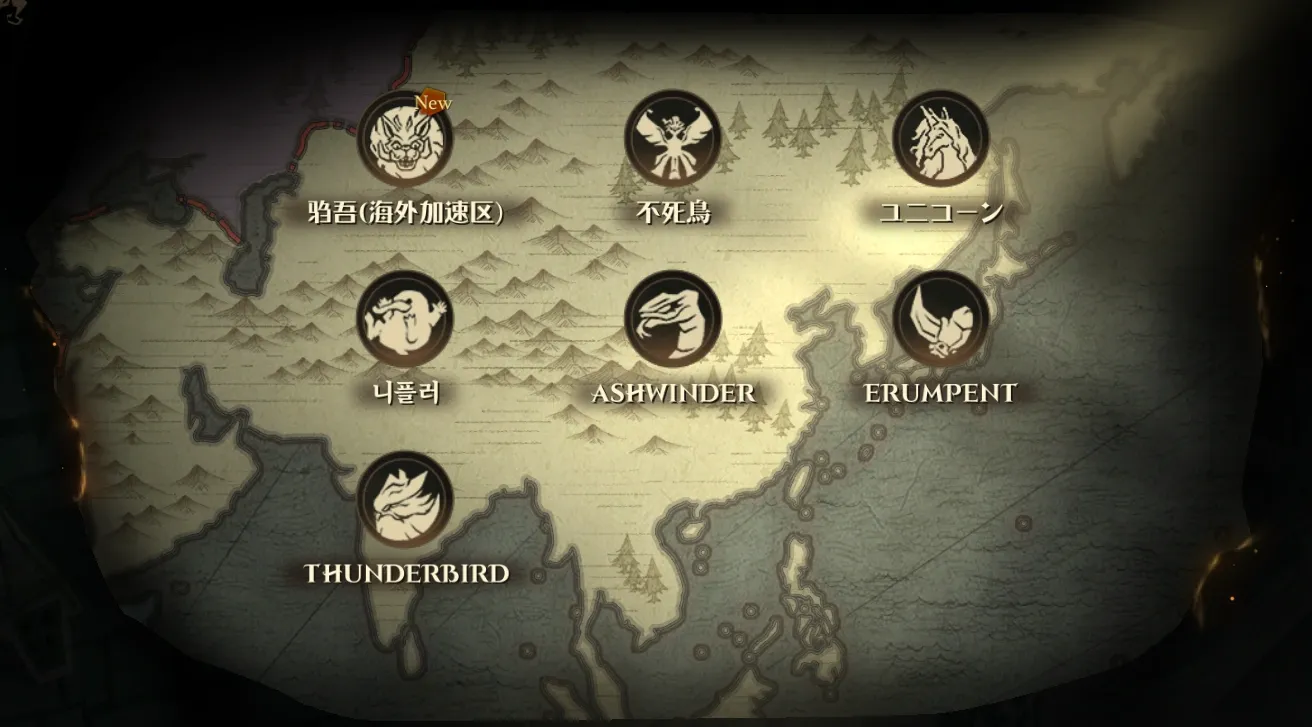
Check the lower third of the screen, nestled under the game logo and right above the entry prompt. A rectangular box displays your currently assigned server, like Chimaera, Sphinx, or Ashwinder. That box is an interactive button, not a static label.
Tapping it pauses the auto-login sequence and opens the full server directory. If you tap anywhere else, the client locks in the displayed server and connects. Once that handshake starts, you are stuck waiting through loading screens just to log out.
Tap the box once on a touchscreen, or click it directly on PC. The drawer slides open with every regional server group your installed client supports.
Step-by-Step Guide to Changing Your Active Server
Switching your active server takes under thirty seconds. Follow these five steps to switch connections without creating duplicate accounts:
- Launch the Game Client and Stop at the Title Screen: Let the client finish its asset check. When the background appears, do not tap the center prompt.
- Tap the Server Banner: Click or tap the rectangular box showing your current server near the bottom of the screen.
- Select Your Target Region Tab: Use the left column to choose your geographic territory (such as Asia or MENA). The cluster list populates on the right.
- Pick Your Specific Server Instance: Click the target server. If you already have a character there, the client loads your existing data upon selection.
- Confirm and Enter Hogwarts: With the target server displayed in the box, tap the center of the screen to connect.
If that server holds an existing save, you spawn straight into your dormitory or Diagon Alley. If you pick an unplayed server, the opening train station prologue starts up. Seeing that intro simply means no save data is tied to your account on that specific shard.
Finding Your Existing Character and Missing Server Profiles
Most "missing" accounts stem from server amnesia: you took a break, reinstalled the game, logged in, and landed on an unfamiliar shard.
Your progress is not lost. NetEase's official privacy disclosures specify that account and registration data is retained for up to one year from collection. Cards, echoes, and cosmetics remain tied to the specific server database where you created that character.
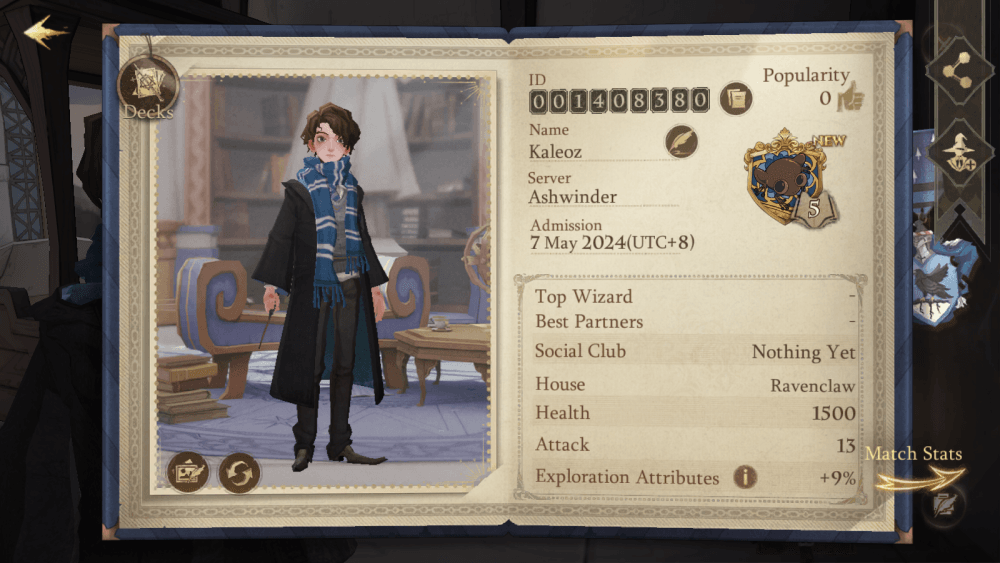
To verify your server and account details in-game:
- Open your Knapsack using the bag icon in the bottom-right corner.
- Tap the Info tab.
- Check the text header above your character name. Your numerical User ID (UID) and assigned server are displayed there.
If you find yourself on a fresh level 1 character, check old screenshots or payment receipts. Locating an earlier screenshot of your Knapsack Info screen gives you the exact server name and User ID needed to find your account.
Platform Setup Differences Across PC, Android, and iOS
Which servers show up on your screen depends on your platform and client version. Desktop and mobile builds handle regional access differently.
The standalone Windows client built by NetEase was historically region-locked to Southeast Asian (SEA) servers. If you download the native PC installer from Asian regional portals, the server list limits you to SEA clusters, with no built-in way to toggle over to other international servers.
To bypass this limitation, players outside Southeast Asia run the Android APK on desktop emulators like BlueStacks. Emulating Android provides the complete NetEase mobile server list, along with standard touch menus and regional filters.
The following comparison outlines how server discovery and client handling differ across platforms.
| Platform | Client Distribution | Server Access Scope | Primary Account Handler |
|---|---|---|---|
| Android Mobile | NetEase Regional APK / Google Play | All operational NetEase regions (Asia/MENA) | NetEase / Social Login |
| iOS (Apple) | Regional App Store (Asia/MENA) | All operational NetEase regions (Asia/MENA) | Apple ID / NetEase Login |
| Standalone PC | Native Windows Client (.exe) | Historically region-locked to SEA servers | NetEase Account QR Scan |
| PC via Emulator | BlueStacks / Android Simulation | Full mobile server list without client lock | Google Play / NetEase Login |
Platform choice dictates which regional servers appear in your directory, with native PC clients restricted to specific Asian clusters while mobile and emulator builds show all operational shards.
If you want high desktop framerates but your character lives outside SEA, an Android emulator remains the standard fix. It mirrors the mobile server list on PC without regional client gates.
Regional Server Clusters and the Impact of Western Server Closure
Publishing history explains why so many accounts cannot be retrieved today. At launch, the game split its global architecture across six regional territories.
Warner Bros. Games managed the Americas, Europe, and Oceania, while NetEase Games ran Chinese Mainland, Hong Kong, Macau, Taiwan, select Asian territories, and the MENA region.
On August 26, 2024, Warner Bros. pulled the game from western app stores. On October 29, 2024, Warner Bros. permanently shut down its western servers across North America, South America, Europe, and Oceania. Over 5,000 western players signed petitions asking NetEase to absorb western accounts or issue refunds. Warner Bros. Games rejected transfers and denied refund requests.
The table below details the original regional server architecture and what remains operational today.
| Region | Launch Server Names | Soft Launch Anchor | Operational Status |
|---|---|---|---|
| Europe | Bowtruckle, Mooncalf, Puffskein | Bowtruckle | Permanently closed Oct 29, 2024 (WB) |
| North America | Diricawl, Ridgeback, Opaleye | Diricawl | Permanently closed Oct 29, 2024 (WB) |
| Oceania | Basilisk | Basilisk | Permanently closed Oct 29, 2024 (WB) |
| South America | Occamy | None (Direct Live) | Permanently closed Oct 29, 2024 (WB) |
| Africa | Acromantula, Nundu | Acromantula | Closed under WB publishing scope |
| West Asia / Asia | Hippogriff, Chimaera, Augury | Hippogriff | Active live service under NetEase Games |
Western servers operated by Warner Bros. Games ceased operations in late 2024, leaving NetEase Asian and MENA servers as the sole active live environments.
If you played on Bowtruckle, Ridgeback, Opaleye, or Diricawl, that character no longer exists. No server toggle in the NetEase client can revive a terminated Warner Bros. account. To play today, you have to connect to an active NetEase server and start anew.
Starting over means rebuilding your deck from scratch. If you want to jumpstart your card collection, picking up Harry Potter: Magic Awakened Jewels gives you immediate access to library passes, vanity boxes, and seasonal shop resources.
Character Segregation and Why Cross-Server Transfers Fail
Can you transfer an established character to a different server? The short answer is no.
Harry Potter: Magic Awakened does not provide transfer tokens, migration tools, or cross-server character moves. Each server functions as a closed database. Card collections, echo upgrades, spell book levels, furniture, and house assignments are locked to the shard where they were generated.
This restriction goes back to the initial launch architecture. Account migration from soft launch shards (such as Diricawl or Bowtruckle) to wider live servers was blocked from day one. Soft launch purchases stayed on those original servers, but characters could never hop between shards.
When you pick a server from the title screen, the client queries that database for your User ID:
- Matching Record Found: The game loads your saved profile.
- No Record Found: The game triggers new character creation and loads the prologue.
Switching servers never erases an existing save. If you jump from Chimaera to Sphinx to check ping, your Chimaera character stays exactly as you left it. You can return at any time through the title screen.
Linked Clusters, Dormitories, and Multiplayer Co-op Rules
Even without character transfers, you do not always need to share a server to play together. The game uses a linked server architecture for specific regional clusters.
Servers grouped within the same linked cluster share multiplayer matchmaking. Players on different shards inside that cluster can add each other as friends, queue together for Best Partner 2v2 duels, run Forbidden Forest explorations, and live in the same dormitory.
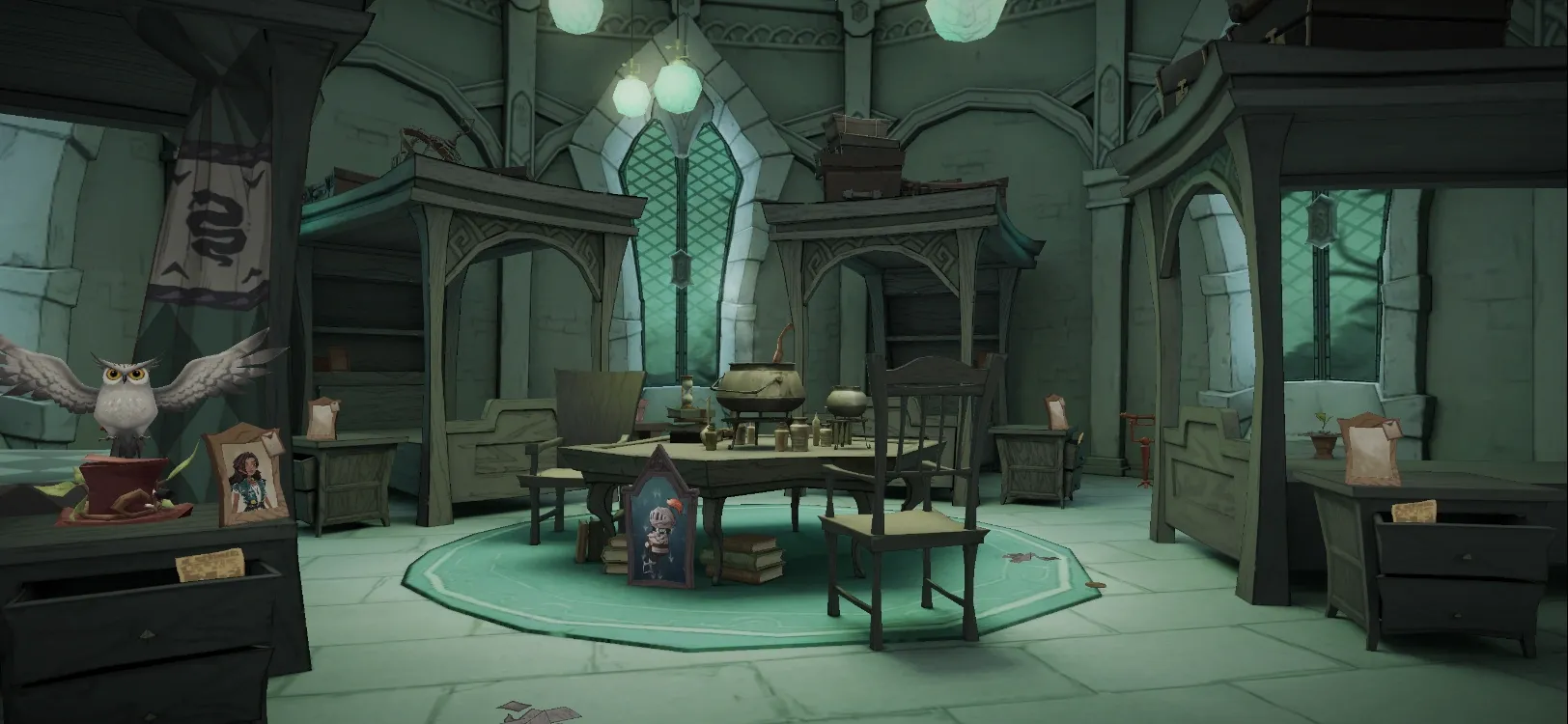
Dormitories house four students of the same Hogwarts house and grant shared rest bonuses. As long as your respective servers belong to the identical linked cluster, you can share a room.
However, soft launch servers were excluded from linked matchmaking. Linked servers also never cross geographical boundaries: a Southeast Asian shard cannot interact with a Chinese Mainland or MENA server. To room or duel together, verify your servers share a cluster before investing.
Binding Jewels and Currency Deliveries to the Correct Server
Premium currency in Harry Potter: Magic Awakened is strictly server-bound. Whether buying Starstones or Jewels, your balance delivers directly to the specific server wallet associated with your profile.
Jewels convert into gems for advanced card packs, cosmetics, and seasonal wheel spins. Third-party recharge portals ask for two identifiers: your numerical User ID and your designated server name.
Select the wrong server, and your currency either fails to process or delivers to a level 1 placeholder character on an empty shard. Rerouting misplaced currency requires support intervention that rarely succeeds.
Before purchasing discounted Magic Awakened Jewels, open your Knapsack Info screen in-game. Confirm every digit of your User ID and match your server name to the store's server selector.
The following table outlines the exact data parameters required when managing server-bound transactions.
| Verification Field | In-Game Location | Purpose | Impact on Top-Up Delivery |
|---|---|---|---|
| User ID (UID) | Knapsack > Info (Above Name) | Identifies your unique account shard record | Critical; wrong UID sends items to strangers |
| Assigned Server | Knapsack > Info & Title Banner | Directs API to the target regional database | Critical; currency delivers only to selected server |
| Character Name | Knapsack > Info Screen | Visual confirmation for the player | Secondary; display check only |
| Pack Tiers | In-Game Shop / Recharge Portals | Standard pack pricing ranges from USD 0.99 to USD 99.99 | Dictates base Jewel yields and bonus gem ratios |
Web top-up systems require exact matching between your numerical User ID and target server name to deliver Jewel packs ranging from USD 0.99 to USD 99.99 successfully.
Whenever you plan your next card pull session, securing your Harry Potter Magic Awakened top up requires matching your exact numerical User ID to the server cluster you actively play on. Skipping this check is the fastest way to misplace your resources.
Troubleshooting Missing Servers and Connection Errors
When the server list is blank, greyed out, or failing to load, use these targeted fixes.
The Missing Server Directory
If the server pop-up is completely blank, your client failed to fetch the live manifest from NetEase's content delivery network—a common hiccup right after major patches. Force-close the app, check your connection, and restart. If the list is still blank, tap the wrench icon (Repair tool) on the title screen to verify client files.
Ping Spikes and Region Latency
Because western servers went offline in October 2024, international players on NetEase Asian shards face higher physical latency. High ping in the Dueling Club (yellow or red network icons in combat) stems from transatlantic routing.
Asian servers work reliably for story missions and card collecting, but dueling demands cleaner timing. If you experience rubberbanding, toggle between 5GHz Wi-Fi and mobile data; cellular networks occasionally find more direct overseas routes to Asian hosts than residential broadband.
Maintenance Lockouts
NetEase regularly takes servers offline for weekly maintenance and seasonal updates. Tapping a server during downtime returns a maintenance window with an estimated finish time. You cannot bypass this queue, and affected shards typically show a red status indicator until the update wraps up.
Frequently Asked Questions
Can I transfer my existing character to another server in Harry Potter: Magic Awakened?
No, character transfers between servers are unsupported. Every save file is permanently tied to the server where it was created, so switching to a new server requires starting over from the prologue.
How do I switch servers on mobile in Harry Potter: Magic Awakened?
Launch the game and pause at the title screen. Tap the rectangular server banner near the bottom center, choose your region and server from the directory, then tap the screen to enter.
How do I switch servers on PC in Harry Potter: Magic Awakened?
On the native PC client, click the server banner on the start screen to view available Southeast Asian servers. If using an Android emulator on PC, click the banner to access the full mobile regional directory.
Will I lose my character progress if I switch servers?
No. Your progress stays intact on the server where you created the character. You can create a new character on another server and switch back to your original profile at any time.
Can players on different servers play together?
Only if their servers share a linked regional cluster. Players on linked servers can team up, duel, and share dorms. Unlinked servers and cross-continental regions cannot interact.
Can western players transfer their accounts to NetEase Asian servers?
No. Warner Bros. Games prohibited account transfers when it closed western servers on October 29, 2024. Western players must download a NetEase client and start a new account.
How do I check which server my character is currently on?
Open your Knapsack from the bottom-right corner and tap the Info tab. Your numerical User ID and assigned server name appear directly above your character's name.
The Final Verdict on HPMA Server Management
Switching servers in Harry Potter: Magic Awakened takes only a tap once you know the banner is an active button. The isolated database design keeps characters safe from accidental overwrites or profile merges when exploring other shards.
For returning western players, the original Warner Bros. servers are gone for good. Bowtruckle, Ridgeback, and Diricawl accounts cannot be restored. Focus on selecting an active NetEase server in Asia or MENA with stable ping, link up with friends within the same cluster, and build your new deck.

Community
Comments