

Activate your miles morales steam key without regional lockouts or activation errors. Here is the verified 2026 guide to register and download your game.
Securing a digital code for Marvel's Spider-Man: Miles Morales is only the first step. You still have to bind the license to your personal Steam account, download the 75 GB game package, and ensure your hardware can handle the swinging physics across a snowy Manhattan. While digital redemption looks straightforward, small slip-ups—like pasting an alphanumeric key into the wrong Valve form or overlooking geographic restrictions—can halt your progress before the game even touches your storage drive.
Marvel's Spider-Man: Miles Morales is an open-world action-adventure PC game developed by Insomniac Games and Nixxes Software and published by PlayStation PC LLC. You control Miles Morales as he defends East Harlem and the rest of New York City using distinct bio-electric venom blasts and camouflage powers. If you picked up a Miles Morales Steam key from a digital storefront, follow this complete walkthrough to claim your copy cleanly and troubleshoot any activation hurdles.
Marvel's Spider-Man: Miles Morales (Steam)
Marvel's Spider-Man: Miles Morales (Steam)
Buy NowUSD 44.03
Desktop Client Activation: Step-by-Step
Redeeming your code through the official Steam desktop client remains the most direct way to get the title into your library. The desktop app verifies your entitlement instantly and immediately queues the 75 GB installation prompt.
- Launch the Steam desktop client on your PC and log into the specific profile where you want to keep the game permanently. Steam keys bind forever; you cannot transfer them between accounts once accepted.
- Look at the bottom-left corner of the main client window. Click the + Add a Game button marked with a small plus sign.
- Alternatively, click the Games menu located along the top system bar.
- Select Activate a Product on Steam... from the small pop-up list.
- Step through the wizard dialog, read the Steam Subscriber Agreement, and hit I Agree.
- Enter your 15-character key into the Product Code box, formatted like
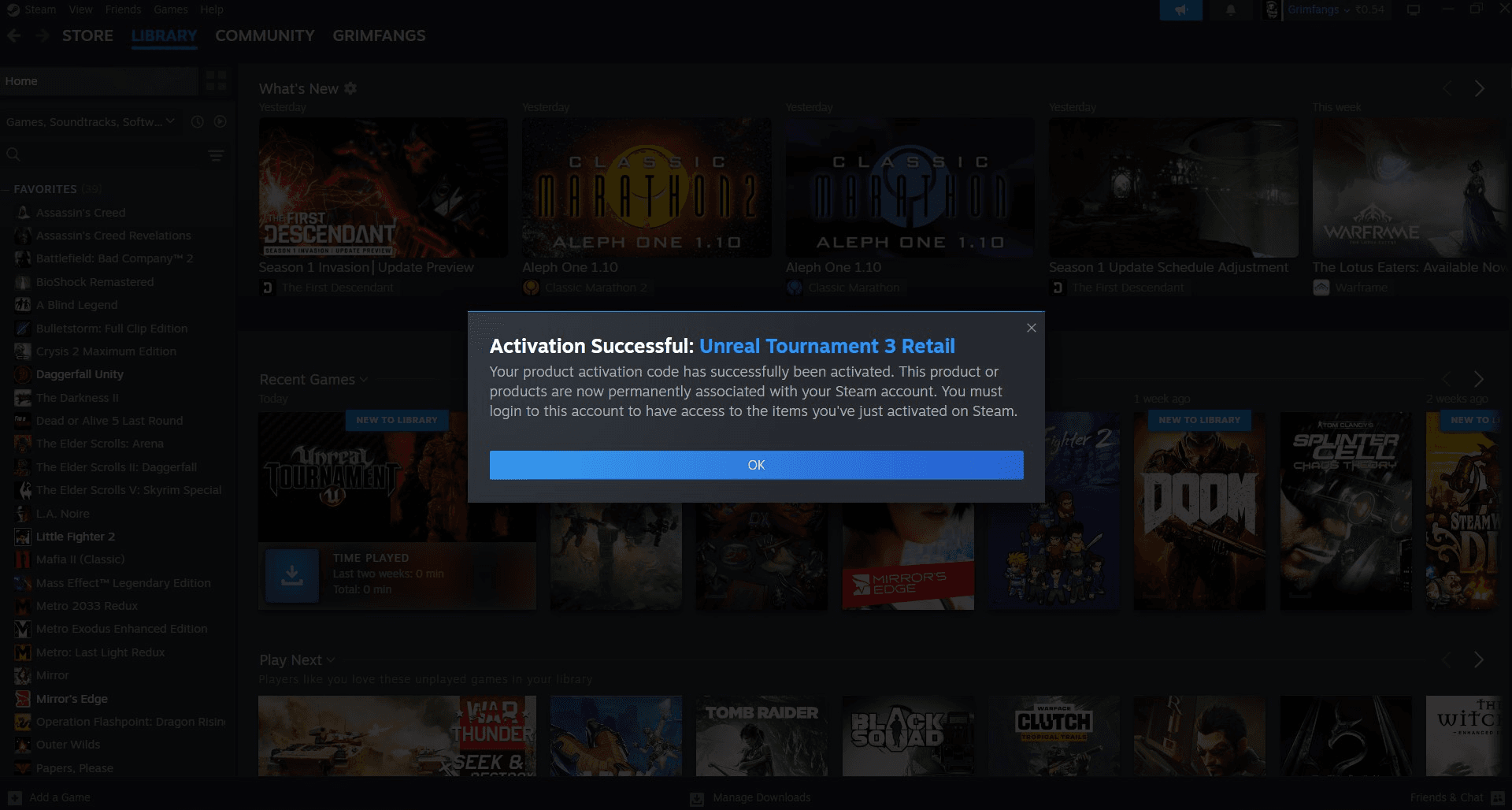
AAAAA-BBBBB-CCCCC. You can paste it directly from your purchase receipt. - Click Next. Steam will contact its authentication servers and display a confirmation screen confirming you own Marvel's Spider-Man: Miles Morales.
- Hit Finish, choose your installation drive, and let the game download.
If you own multiple drives, pick an SSD. Mechanical hard drives technically support the files, but world streaming stutters heavily when web-swinging at speed if you use an older platter drive.
Browser and Mobile Key Redemption Methods
You do not need to sit at your desktop gaming rig to register your purchase. Valve runs an encrypted web registration portal that connects directly to your cloud library.
Open any browser on your PC, tablet, or smartphone and head directly to:
store.steampowered.com/account/registerkey
Log in with your Steam credentials. Review the subscriber agreement checkmark, paste your 15-character code, and hit Register Key. The site links the game license to your account on the spot.
Activating through your phone's mobile browser offers one major perk: remote installation.
If your desktop is powered on with Steam running, registering the key in your browser lets you queue the 75 GB download immediately. By the time you get home, the files are unpacked and ready.
Watch out for a common trap here: the Steam mobile app itself does not have a dedicated game key activation screen. The native app only provides a redemption page for Steam Wallet gift cards. If you paste a game key into the Steam Wallet field on mobile, Steam returns an error saying the code is unrecognized. Skip the app's wallet page entirely and use the direct web registration link in your mobile browser instead.
| Redemption Method | URL / Path | Accepts Game Keys? | Remote Install Supported? |
|---|---|---|---|
| Desktop Client | + Add a Game > Activate a Product... | Yes | Yes (Direct) |
| Web Browser | store.steampowered.com/account/registerkey | Yes | Yes (Cloud Queue) |
| Mobile App Wallet Menu | Account > Redeem Wallet Code | No | No |
Using the browser portal bypasses the mobile app's wallet restriction entirely.
Miles Morales Steam Key Global vs Region Lock Rules
Not every digital key functions everywhere in the world. Publishers assign region tags to digital licenses to account for pricing tiers, local licensing laws, and currency markets. When you buy a Marvel's Spider-Man: Miles Morales digital code, you must confirm your Steam account's designated region matches the key's region.
Key categories fall into three buckets: - Global Keys: Engineered to redeem in almost every country without issue. - Regional Keys: Restricted to territories like Europe (EU), Latin America (LATAM), or North America (NA). An EU key will fail immediately if applied to an account set to the United States. - Country-Specific Exclusions: Even keys sold as "Global" often carry fine-print exceptions. Retailer specifications for Marvel's Spider-Man: Miles Morales Global keys explicitly state that they cannot be activated in Singapore.
If you reside in Singapore or hold a Singapore-based Steam wallet, you must purchase a specific Southeast Asian or local key rather than a generic Global product. If you try to redeem a restricted code, Steam halts the process with a message stating the item is not available for purchase or activation in your country.
Do not try to circumvent these barriers with a VPN. Changing your virtual IP address while redeeming keys violates the Steam Subscriber Agreement and can trigger fraud flags on your profile, locking your ability to redeem games in the future.

Solving the Miles Morales Steam Code Not Working Errors
Encountering an error code during activation is frustrating, but most issues stem from a handful of predictable causes. Before assuming the merchant sent a dead key, work through these diagnostic checks.
Character Confusion
Key distributors use automated scripts to generate alphanumeric text, and certain characters look identical in standard digital fonts. If you type the key manually, verify these character pairs: - The number 0 and the letter O - The number 1 and the capital letter I or lowercase l - The number 8 and the capital letter B - The letter V and the letter U
Copy and paste the string whenever possible to rule out human error.
Key Format Discrepancies
Check the structure of your code. Steam product keys use standard sets of characters, usually three blocks of five letters and numbers separated by hyphens (AAAAA-BBBBB-CCCCC). If your code uses a different pattern, verify what you purchased. Steam Wallet Codes use an XXXXX-XXXXX-XXXXX format and belong on the Wallet Redemption screen, not the Product Activation screen.
| Error Message | Probable Root Cause | Immediate Action Required |
|---|---|---|
| Invalid Product Code | Typo, wrong character, or pasted into Wallet box | Check 0/O and 1/I; verify key pattern format |
| Duplicate Product Code | Key has already been redeemed on another Steam account | Contact merchant support with your invoice receipt |
| Not Available in Your Territory | Key region does not match your Steam account country | Verify region tags; remember Global keys exclude Singapore |
| Too Many Activation Attempts | System lock after repeated failed code entries | Wait 60 minutes before entering any new keys |
Match your error message to the right column before attempting another code entry.
If Steam locks your activation attempts due to multiple failed tries, step away from your PC. Entering more characters will only extend the temporary cooldown timer. Wait a full hour for the security throttle to clear, check your receipt for typographical issues, and try again.
PC System Requirements and Installation Footprint
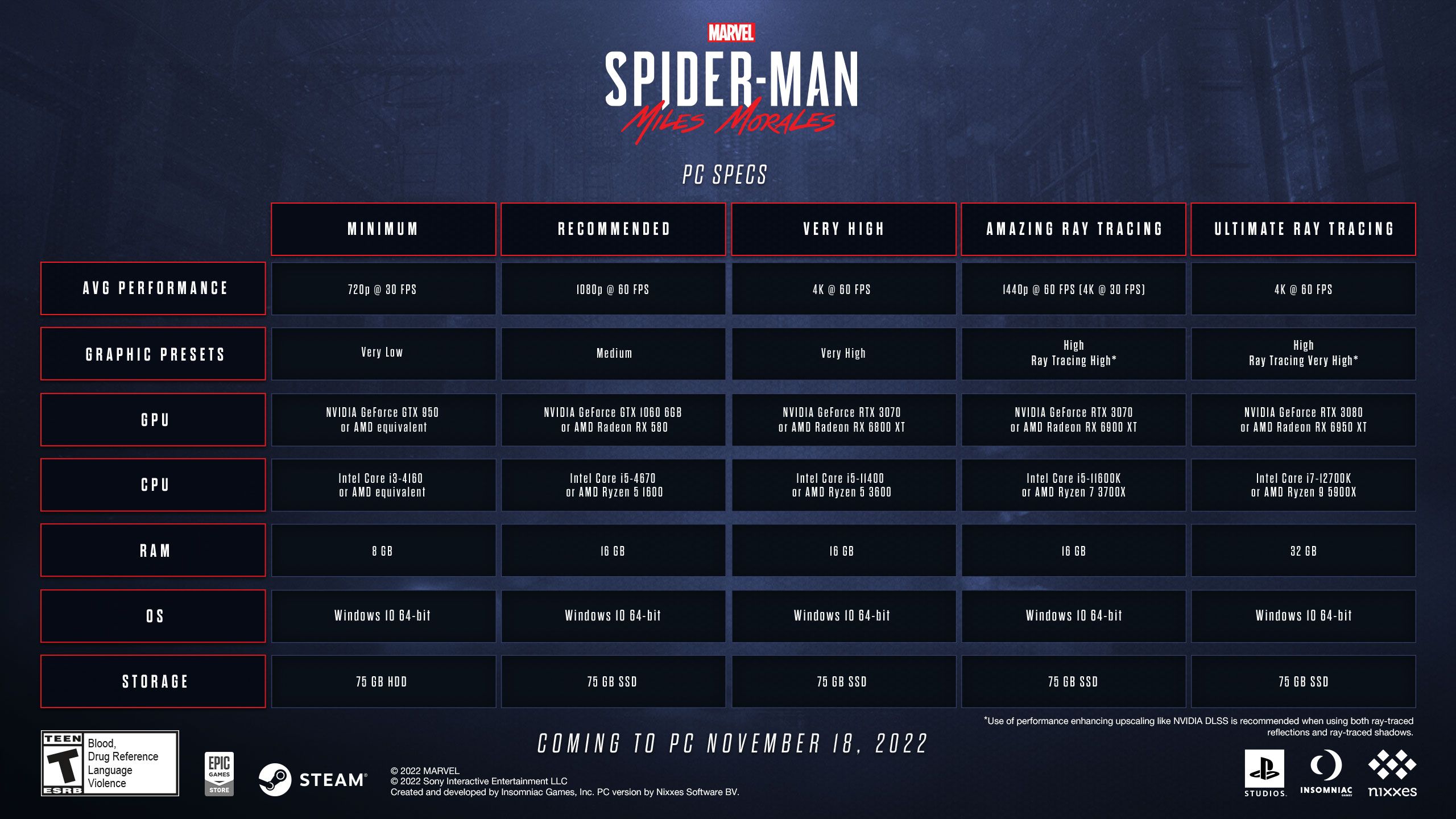
Once the key activates, your system must actually download and render the game. Miles Morales features dense open-world cityscapes with dynamic crowds, weather physics, and ray-traced reflections. Reviewing the hardware thresholds prevents performance bottlenecks.
| Specification Tier | Target Performance | Processor (CPU) | Graphics Card (GPU) | RAM & Storage |
|---|---|---|---|---|
| Minimum | 720p @ 30 fps | Intel Core i3-4160 (3.6 GHz) or AMD equiv | NVIDIA GTX 950 or AMD Radeon RX 470 (2 GB) | 8 GB RAM, 75 GB HDD (SSD recommended) |
| Recommended | 1080p @ 60 fps | Intel Core i5-4670 or AMD Ryzen 5 1600 | NVIDIA GTX 1060 (6 GB) or AMD RX 580 (8 GB) | 16 GB RAM, 75 GB SSD space |
| Very High | 4K @ 60 fps | Intel Core i5-11400 or AMD Ryzen 5 5600X | NVIDIA RTX 3070 or AMD Radeon RX 6800 XT | 16 GB RAM, 75 GB SSD space |
Target the Recommended tier at minimum for fluid 60 fps web-swinging.
The game requires a clean 75 GB chunk of drive space. While the minimum spec notes that standard 720p 30 fps gameplay will run on a traditional mechanical hard disk drive, the developer strongly recommends an SSD across all tiers. If you install on an HDD, fast traversal across Manhattan can outpace the drive's read speeds, resulting in temporary freezing while assets stream in.
Post-Activation Setup: Fixes for Crashes and Performance
A successful redemption does not guarantee a smooth first boot. Nixxes Software and Insomniac released targeted PC patches to address known hardware quirks and launch crashes.
Windows 11 Desktop Crash Fix
Early PC releases suffered an issue where players experienced instant crashes back to the desktop on Windows 11 when loading saves or retrying in-game challenges. This was traced to an internal buffer overflow issue. If your game crashes after the opening logos, verify that Windows 11 is fully updated so Steam pulls the latest patched game executable.
High-Core CPU Optimization
If you run modern high-end desktop hardware, you might see unexpected frame drops. Patches specifically targeted CPU utilization on: - Intel 11th Gen and older processors featuring 8 or more cores (such as Core i9 9th through 11th Gen chips) - AMD Ryzen 9 7950X and Ryzen 9 7900X processors
Make sure Steam updates the game automatically. The patches balance thread allocation across high-core architectures, stopping the hitching that previously occurred during high-speed swinging sequences.
Verifying File Integrity
Large 75 GB downloads occasionally drop packets or corrupt local packages during decompression. If your game stutters or crashes during launch: 1. Open your Steam Library. 2. Right-click on Marvel's Spider-Man: Miles Morales and select Properties. 3. Click the Installed Files tab on the left menu. 4. Click Verify integrity of game files.
Steam will hash your local files against its game depots and quietly redownload any corrupt assets without forcing a full 75 GB reinstall.
Buyer Profiles: Which Key Tier Fits Your Setup?
Miles Morales is a standalone single-player campaign without microtransactions or battle passes. Budget decisions come down to how and where you source your license.
The Budget-Focused Player
If you want the base campaign without extras, standard digital keys represent the sweet spot. Third-party marketplace listings for Marvel's Spider-Man: Miles Morales Standard Edition CD keys regularly float between $15.61 and $16.63 on competitive days, though standard retail prices can reach up to $49.99. Buying a legitimate standard key gives you the entire core campaign, all standard suits, and every gameplay update without paying full launch price.
The Enthusiast / Hardware Maxer
If you run an RTX 3070, RX 6800 XT, or better, you are buying the PC version specifically to push ultra-wide monitors, uncapped frame rates, and ray-traced reflections that consoles cannot match. Pair a standard key with an upgraded NVMe SSD drive to ensure the 75 GB asset pipeline streams smoothly at 4K 60 fps.
The Steam Deck / Portable Gamer
Miles Morales runs exceptionally well on handheld PC platforms. The game scales down nicely to fit portable power envelopes. If you spend most of your time on the go, a standard Global key provides full cloud-save compatibility between your main desktop rig and your portable handheld.
Spotting Legit Key Sellers vs Account Scams
When searching for discounted Steam keys, you will inevitably encounter rogue sellers trying to take shortcuts. Knowing what a safe digital delivery looks like protects both your money and your Steam account standing.
Legitimate key merchants deliver an actual 15-character alphanumeric code directly to your screen and confirmation email. You take that code, open your own Steam client, and bind it to your existing profile. A secure shop never asks for your Steam username, never requests your password, and never asks you to disable Steam Guard authentication.
Be on high alert for sellers offering "Steam Accounts" instead of product keys. In this scheme, the seller provides an email and password to a pre-created Steam account that already owns the game. This explicitly violates Valve's Terms of Service. Valve actively detects and bans shared, traded, or resold accounts. On top of that, the original creator can recover the account through Steam Support at any time, locking you out permanently.
Always insist on a true activation key. When you are ready to expand your library safely, order a Miles Morales PC key from trusted delivery channels that issue genuine alphanumeric codes for your own account.
FAQ
How do I redeem a Miles Morales Steam key in the desktop client?
Open your Steam client, click the + Add a Game button in the bottom-left corner, and choose Activate a Product on Steam. Agree to the terms, paste your 15-character alphanumeric key into the text field, and hit Next to claim the game.
Can I activate my Miles Morales Steam key in a web browser?
Yes, you can register keys directly by visiting store.steampowered.com/account/registerkey in any desktop or mobile browser. Log into your Steam account, enter your product code, and confirm the redemption.
Can I redeem a game key directly inside the Steam mobile app?
No, the native Steam mobile app only contains a redemption field for Steam Wallet cards, which will reject game activation keys. To activate a game on mobile, open your device's web browser and go to Steam's product registration page instead.
How much drive space does Marvel's Spider-Man: Miles Morales require on PC?
The game requires at least 75 GB of available storage space. Installing the game on a fast solid-state drive (SSD) is strongly recommended to eliminate hitching during fast web-swinging.
Why is Steam telling me my key is invalid?
Invalid key errors are almost always caused by typing mistakes, such as confusing the number 0 with the letter O or the number 1 with the letter I. Make sure you are not entering the game code into the Steam Wallet redemption field.
What should I do if the key says it has already been registered?
A duplicate code error means the key was already redeemed on another Steam account before you received it. Contact the merchant where you purchased the code immediately and provide your receipt so their support team can verify the issue and issue a replacement.
Are Marvel's Spider-Man: Miles Morales Steam keys region-locked?
Yes, many Steam keys are locked to specific territories such as the EU, LATAM, or North America. Even Global keys carry certain geographic exclusions, notably failing to activate in Singapore.
Ready to Swing Across New York
Activating Marvel's Spider-Man: Miles Morales on Steam is simple once you stick to the verified registration pathways. Avoid typing keys into mobile wallet fields, double-check your region compatibility before finalizing your order, and reserve 75 GB on an SSD for optimal performance. Once the key is bound to your profile, the game stays in your permanent collection across any PC rig you build or upgrade down the road. Grab your code, let Steam unpack the files, and start mastering Miles' venom strikes.

Community
Comments