

A GoCash checkout blank screen or frozen payment modal occurs when your web browser blocks cross-domain scripts, halts third-party authentication cookies, or experiences a GPU hardware acceleration crash while loading the payment frame. To fix it, clear your browser cache and cookies for all time, disable ad blockers and VPN extensions, turn off hardware acceleration in your Chromium browser settings, and permit third-party cookies so the embedded payment iframe can authenticate.
GoCash (Global)
Quick Diagnostic Checklist
Before adjusting system configurations, determine whether the failure stems from your local browser environment or an external gateway disruption. The table below outlines each primary failure trigger, the target configuration, and its documented resolution.
| Setting / Component | Action Required | Technical Cause and Reference |
|---|---|---|
| Browser Cache & Cookies | Clear cache and cookies for "All Time", then restart the entire browser application | Outdated cached scripts prevent payment gateways from executing interactive forms (Arca Noae). |
| Extensions & Ad Blockers | Disable all ad blockers, script blockers, and VPN extensions | Privacy add-ons intercept external checkout scripts, stranding frames (Zoom Support). |
| Pop-ups & Redirects | Add the game billing URL to the browser's Pop-ups "Allow" list | Default blockers intercept external gateway tabs, stalling on about:blank (Microsoft Support). |
| Hardware Acceleration | Toggle hardware acceleration off in browser system settings | GPU rendering conflicts produce blank white or black frames in Chromium (Brave Community). |
| Third-Party Cookies | Enable third-party cookies or create an exception for the payment provider | Cross-domain checkout frames lose session state when cross-site data is blocked (Privia Support). |
| Web Protection / Antivirus | Temporarily pause web shields or add the store domain to exclusions | Deep packet inspection suites block external payment analytics and frames (Funcom Forums). |
Step 1: Clear Corrupted Browser Cache and Perform a Full Process Restart
Payment gateways frequently update checkout scripts to secure card validation routines. When an outdated script remains in the browser cache, interactive form fields fail to execute, leaving a blank white container.
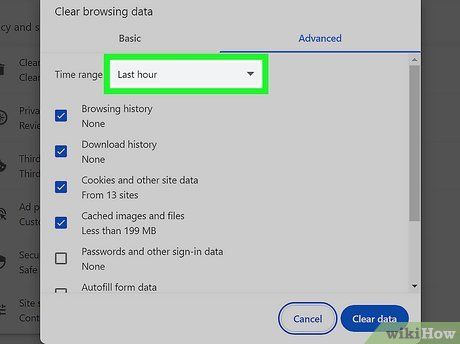
A standard page refresh will not clear these stale assets. Open browser history settings, select Cache and Cookies, set the time range to All Time, and clear the data (Arca Noae).
Exit the browser completely once finished. Simply closing the checkout tab leaves background helper processes active in memory. Close every window or end the browser process tree in Task Manager before relaunching.
Step 2: Disable Extensions Blocking the GoCash Payment Frame
Ad blockers, anti-tracking tools, and browser VPN extensions inspect outgoing and incoming network requests. Because GoCash forms load validation scripts from third-party billing domains, strict privacy filters often flag the payment iframe as an intrusive tracker and cut the connection.
Disabling ad blockers, script blockers, and proxy extensions prevents the frame from stalling before assets load (Zoom Support).
Testing in an Incognito window can quickly rule out extension conflicts, but Chromium browsers disable third-party cookies by default in private mode. If the GoCash frame depends on cross-domain session tokens, testing in standard Incognito simply replaces an extension block with a cookie failure.
Step 3: Enable Third-Party Cookies and Cross-Domain Sessions
Game portals rarely host the GoCash redemption form on their primary domain; they embed an external billing gateway.
When your browser rejects third-party cookies, this embedded frame cannot store the temporary authentication token needed to register voucher inputs. Blocking third-party cookies causes cross-domain frames to drop session state and fail to render (Privia Support).
To correct this: 1. Open your browser settings and navigate to the Privacy and Security section. 2. Locate the Cookies and other site data menu. 3. Verify that third-party cookies are not completely blocked, or explicitly add the host game domain and billing gateway to the "Allowed to use third-party cookies" list.
Step 4: Whitelist Billing Pop-Ups and Redirects
Some game portals open the GoCash redemption form in a separate pop-up window rather than an inline frame. If your browser enforces strict pop-up blocking, that secondary tab is halted before its payload downloads, leaving you on about:blank.
Look for a blocked pop-up icon in the address bar and select the option to always permit redirects from the portal. Alternatively, open site permissions in your browser settings, choose Pop-ups and redirects, and add the site's full https:// address to the allowlist (Microsoft Support).
Step 5: Disable Hardware Acceleration to Fix Black Screens
A solid black container or frozen browser tab points to a hardware rendering conflict rather than an extension filter. Chromium browsers (Chrome, Edge, Brave) offload visual compositing to the graphics processor through hardware acceleration.
GPU driver incompatibilities can cause webview rendering processes to crash silently (Brave Community), leaving an empty black frame.
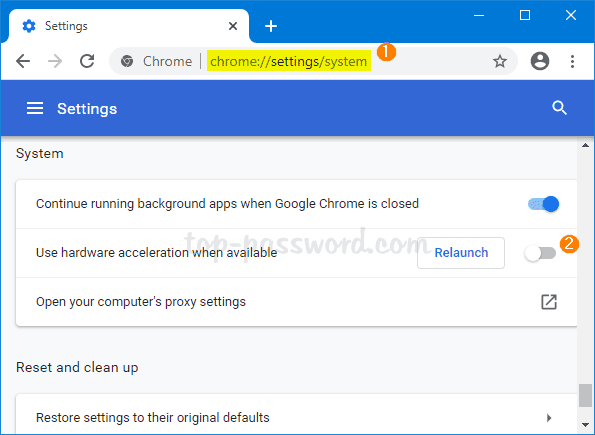
- Open browser settings and search for System.
- Locate the setting labeled Use hardware acceleration when available (or Use graphics acceleration when available).
- Toggle the option off.
- Click the prompt to relaunch the browser.
For advanced configurations where hardware acceleration must remain enabled for other tasks, adjusting the underlying ANGLE graphics backend flag (for example, switching between DirectX and OpenGL modes) can resolve rendering conflicts without disabling GPU compositing entirely.
Step 6: Configure Web Shields and Antivirus Exclusions
Antivirus suites with active web shields (such as Kaspersky Internet Security) inspect encrypted web traffic and can drop connections to domains flagged as external payment processors.
When the connection to the billing server is severed, the embedded store frame renders as an unrendered or black window (Funcom Forums). To isolate the cause:
- Temporarily pause your antivirus web protection shield.
- Refresh the payment gateway and attempt to reach the GoCash PIN entry prompt.
- If the page loads successfully, reinstate your security shield and add the game store and payment domain to the antivirus exclusion list.
Gateway Inactivity and Voucher Limitations
If the redemption page continues to hang after all browser-level adjustments, the breakdown likely stems from gateway status or issuer policies rather than local settings.
Operational Status of GoCash Global
An official operational announcement on gocash.global states that GoCash Global terminated its operations on July 1, 2026. While third-party digital voucher marketplaces (including SEAGM, Coinsbee, and Giftsy) historically distributed these cards, and the legacy portal at gocashgamecard.com has preserved standard card guidance, any game merchant whose checkout attempts to route directly to decommissioned global gateway infrastructure will encounter broken connections or blank screens. If a merchant checkout fails to connect to the global server, contact that publisher's billing department to confirm their supported alternative payment methods.
Card Validity and Splitting Policies
GoCash Game Card rules hosted on gocashgamecard.com require cards to be redeemed within one year from the date of retail purchase or activation. Standard users must redeem the card for its full face value on a single portal; value cannot be split across multiple titles unless the user holds a designated Gold Member account status. All redemptions are final upon entry. While third-party reseller platforms such as Coinsbee claim that gaming vouchers either do not expire or vary by distributor, the official issuer terms enforce the one-year window from original activation.
Players sourcing prepaid gaming vouchers can check options like GoCash (Global) for catalog listings, but must confirm that the target game portal maintains an active, functioning payment route before completing checkout.
Frequently Asked Questions
Why does the GoCash payment tab stall on "about:blank"?
This happens when your browser's pop-up blocker catches the redirect to the billing portal midway through execution. Add the game's billing domain to your browser's pop-up allowlist and disable external privacy extensions so the redirect can hand off the session payload (Microsoft Support).
Does Incognito mode always resolve payment frame errors?
No. While Incognito disables third-party extensions and bypasses cached assets, Chromium browsers block third-party cookies by default in private sessions. Because external checkout iframes rely on cross-site cookies to maintain session authorization, running private browsing without enabling third-party cookies can cause the form to fail (Privia Support).
Why is the payment modal rendering as a solid black screen?
Solid black frames in Chromium browsers (Chrome, Edge, Brave) are commonly caused by GPU hardware acceleration conflicts. Open your browser system settings, toggle hardware acceleration off, and restart the browser completely (Brave Community).
Can my desktop antivirus block the redemption window?
Yes. Security software featuring active web traffic filtering can terminate external script connections required by checkout modals. When those connections are dropped, the payment container displays a blank or black window. Temporarily pausing web protection or adding domain exclusions will verify whether the suite is interfering (Funcom Forums).

Community
Comments