

To reduce HK Nintendo eShop lag, update your Switch console to system version 22.5.0 or later, configure manual DNS servers such as Google Public DNS (8.8.8.8 and 8.8.4.4), keep your MTU at the default 1400, and ensure your link satisfies Nintendo's baseline of 3 Mbps download and 1 Mbps upload within 3 to 4 metres of your router. If your console freezes during voucher redemption, bypass the Switch storefront interface entirely by entering your code through Nintendo's web portal.

Nintendo eShop Gift Card (HK)
Update System Firmware for the Built-In eShop Redesign
Outdated console software causes severe store sluggishness. On June 15, 2026, Nintendo released Switch system update version 22.5.0, which overhauled the eShop interface. The update specifically targets storefront latency and introduces automatic interface matching for system themes like Basic Dark.
Before adjusting routing parameters, confirm your console is current:
- Open System Settings from the home menu.
- Scroll down to System.
- Select System Update to install version 22.5.0 or later.
Configure Manual DNS and Network Settings
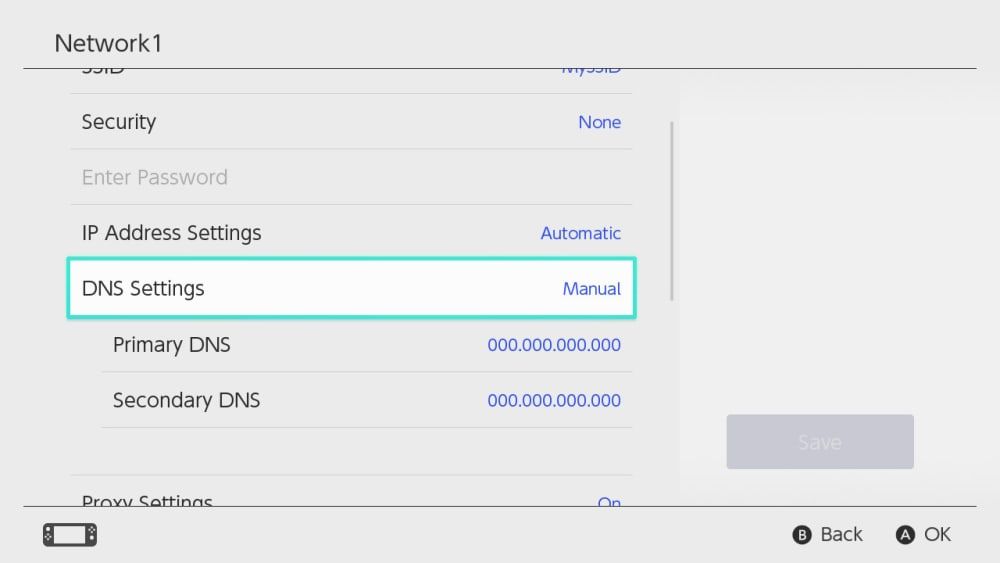
Queries to the Hong Kong storefront frequently stall when routed through standard ISP resolvers. Manually assigning public DNS addresses allows the console to reach regional Nintendo content delivery networks without lookup timeouts.
| Setting | Value | Operational Context |
|---|---|---|
| Google Public DNS | Primary: 8.8.8.8 Secondary: 8.8.4.4 | Official Nintendo Support troubleshooting configuration for resolving eShop loading failures. |
| Cloudflare Public DNS | Primary: 1.1.1.1 Secondary: 1.0.0.1 | Community-tested alternative for bypassing upstream routing stalls on static setups. |
| Baseline Throughput | 3 Mbps down / 1 Mbps up | Nintendo minimum network benchmarks to maintain stable store communication. |
How to apply DNS settings on the Switch
- Go to System Settings > Internet > Internet Settings.
- Select your Wi-Fi network or wired connection, then choose Change Settings.
- Select DNS Settings and switch it from Automatic to Manual.
- Input
008.008.008.008as the Primary DNS and008.008.004.004as the Secondary DNS. - Save your settings and run the connection test.
Official Nintendo UK troubleshooting documentation highlights physical distance as a key factor in throughput drops. Place the console within 3 to 4 metres of your wireless router, or switch to a 5GHz band or a wired LAN adapter.
Leave MTU at the Default 1400
A persistent piece of online advice urges players to raise the Switch MTU (Maximum Transmission Unit) to 1500 to expand packet sizes. Do not do this on broadband lines connecting to overseas storefronts.
Community network diagnostics documented on the Netgate technical forums demonstrated that increasing MTU above Nintendo's factory default of 1400 triggers severe packet fragmentation on PPPoE and tunneled lines. In these tests, raising MTU throttled download speeds to 50 KB/s. Keep the MTU at 1400 unless your specific gateway explicitly requires a different packet size.
Bypass Console Code Redemption Freezes
The Hong Kong eShop client frequently hangs when opening the on-screen keyboard or processing vouchers. If you are funding your account balance using a Nintendo eShop Gift Card (HK), you can bypass the console storefront entirely.
According to MyGiftCardSupply's redemption documentation, Nintendo accepts the 16-character code directly through its official browser portal at ec.nintendo.com/redeem:
- Open a desktop or mobile browser and sign in to your Hong Kong Nintendo Account.
- Navigate to
ec.nintendo.com/redeem. - Enter your 16-character voucher code.
- Confirm the prompt to credit your HK balance immediately.
This web method requires your account to have accessed the eShop on a physical Switch at least once. Hong Kong eShop cards are strictly locked to accounts registered in Hong Kong, but do not require a local payment card. If you change an existing account's region to match a card, any unspent balance in your previous currency is permanently forfeited.

Community
Comments