

UniPin checkout lag and payment gateway timeouts on Android typically occur when stale browser cache, memory starvation, background data restrictions, or misconfigured secure DNS interrupt payment redirects. Configuring Android Data Saver to grant unrestricted data to your browser, switching Chrome secure DNS or setting static lookups to Google Public DNS addresses like 8.8.8.8 and 8.8.4.4, and purging stored browser cookies and cache resolve these stalled handshakes. Because UniPin Voucher MY redemption requires real-time verification against a UniPin Malaysia account, an uninterrupted browser session prevents payment state errors during voucher processing.

UniPin Voucher MY
- -30%
UniPin Voucher MYR 5
Buy NowUSD 1.60
USD 2.08
- -30%
UniPin Voucher MYR 10
Buy NowUSD 3.07
USD 3.99
- -30%
UniPin Voucher MYR 30
Buy NowUSD 9.15
USD 11.89
- -30%
UniPin Voucher MYR 50
Buy NowUSD 12.23
USD 15.89
- -30%
UniPin Voucher MYR 100
Buy NowUSD 24.17
USD 31.43
- -30%
UniPin Voucher MYR 300
Buy NowUSD 72.23
USD 93.90
- -30%
UniPin Voucher MYR 500
Buy NowUSD 118.94
USD 154.63
- -30%
UniPin Voucher MYR 1000
Buy NowUSD 235.82
USD 306.56
- -30%
UniPin Voucher MYR 2000
Buy NowUSD 461.35
USD 599.75
- -30%
UniPin Voucher MYR 3000
Buy NowUSD 723.48
USD 940.53
Clearing Chrome Cache and Memory Bottlenecks
When a mobile web store redirects to a third-party gateway or process page, your Android browser must execute scripts and load security certificates without delay. Stale browser data and memory pressure frequently cause page stalls, blank screens, or "Aw, Snap!" connection failures.
To resolve loading and connection faults, Google Chrome Android Help recommends freeing system memory and clearing cached site files:
- Launch Chrome on your Android device.
- Tap the three-dot menu in the top-right corner and select New Incognito tab to test if extensions or cached session cookies were causing the redirect freeze.
- If errors persist in regular browsing, tap Settings > Privacy and security > Delete browsing data.
- Select Cookies and site data along with Cached images and files, then tap Delete data.
- Open your Android device's app switcher and swipe away unused applications and tabs to free up active RAM before reattempting voucher redemption.
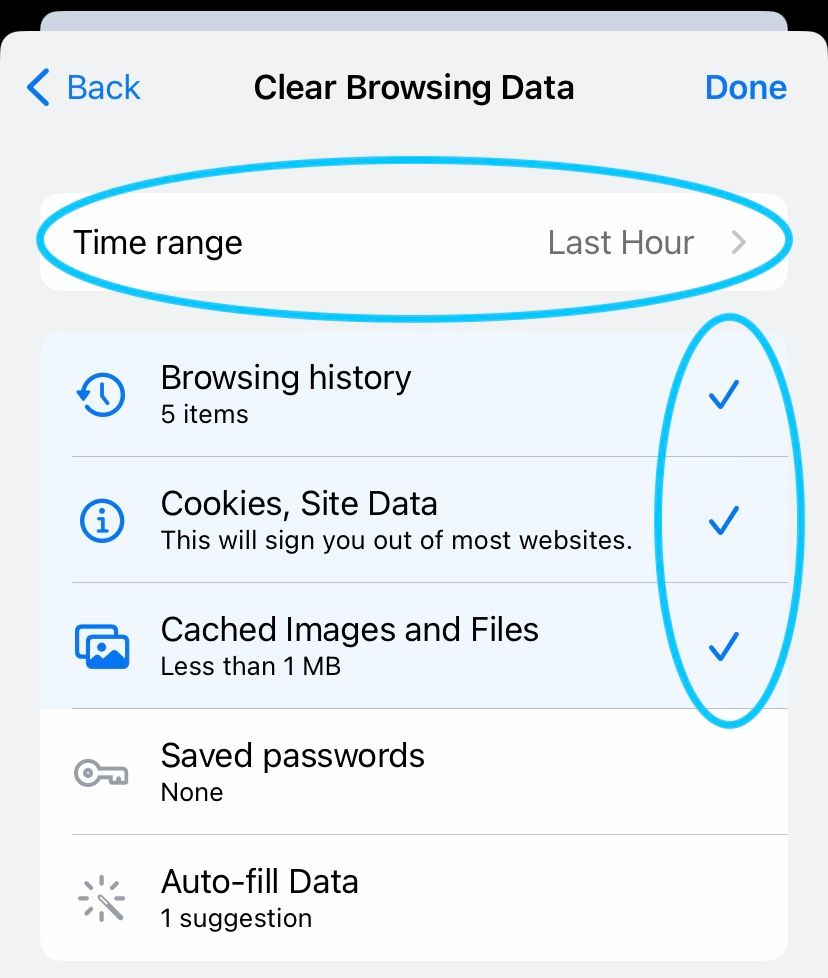
Purging cache introduces a known trade-off. Technical documentation from Median points out that continually clearing web storage forces the browser to download static assets repeatedly, which slows initial page load times. Conversely, Google Chrome troubleshooting mandates cache clearing whenever an active page refuses to load or times out during authentication. The practical rule is simple: clear your cache when an active checkout loop breaks, but avoid clearing it before every normal purchase.
Resolving Gateway Timeouts Caused by Android Data Saver
Android operating systems include a native Data Saver mode to curb background cellular usage. While practical for limiting data expenses, it routinely breaks payment handshakes.
Payment gateways rely on two-way asynchronous callbacks. When you navigate from a game to an external browser window or banking interface, Android may suspend network communication for the background app. As noted by Google Pixel Phone Help, apps will fail to complete back-and-forth handshakes unless granted unrestricted background data permissions.
Adjust your Android network privileges with these steps:
- Open your phone's Settings app.
- Navigate to Network & internet > Data Saver.
- If Data Saver is enabled, tap Unrestricted data.
- Scroll through the installed application list and toggle the switch to On for Chrome (or your default browser) and your game client.
Granting unrestricted access ensures that redirect tokens pass between the payment aggregator and your session without triggering a gateway timeout.
Eliminating Host Lookup Failures with Secure DNS
DNS misconfigurations generate server address lookup errors, leaving your browser spinning on a blank white redirect screen. Chrome on Android uses secure DNS lookup in automatic mode by default, falling back to unencrypted resolution if the lookup fails. However, if a custom secure DNS provider is chosen and experiences downtime, Chrome refuses to fall back, causing permanent gateway timeouts according to Google Chrome Help.
If you encounter host resolution errors on the UniPin checkout portal, review your secure DNS configuration:
- In Chrome, open Settings > Privacy and security.
- Select Use secure DNS.
- If a custom provider is selected and causing timeouts, toggle the option back to With your current service provider or disable secure DNS temporarily to verify connectivity.
- Alternatively, configure your network settings to use verified public DNS resolvers such as Google Public DNS using IP addresses
8.8.8.8and8.8.4.4to reduce recursive DNS resolution latency.
Managing In-App WebView Cache and Redirect States
Many mobile games open UniPin checkout pages inside an embedded WebView rather than a standalone browser window. Stutter and freezing inside in-app checkout overlays relate directly to how Android manages WebView storage.
Microsoft .NET API docs for Android WebView note that Android stores WebView resources on a per-application basis across all embedded views within that instance. Clearing the host game app's cache from Android system settings flushes this shared WebView cache when an in-app payment frame freezes.
The following table outlines how standard WebView cache modes dictate asset handling and network activity, based on Median's WebView documentation:
| WebView Cache Mode | Asset Handling Behavior | Troubleshooting Context |
|---|---|---|
default | Uses system default caching behavior | Standard production mode for mobile browsing and checkouts. |
no_cache | Always loads from the network, never uses local cache | Bypasses corrupted assets and expired payment redirect tokens. |
cache_else_network | Uses local cache if available; fetches from network only if missing | Reduces bandwidth but risks loading expired or stale redirect sessions. |
cache_only | Only uses cached content; completely blocks network requests | Reserved for offline workflows; causes total failure on live payment gateways. |
If an embedded in-app checkout hangs repeatedly, copy the redemption URL and open it directly in a dedicated Chrome tab configured with unrestricted background data.
Region Prerequisites: UniPin Malaysia Account Verification
Network latency and checkout errors can sometimes be mistaken for account mismatch issues. A UniPin Voucher MY delivers UniPin Credits (UP) to top up games including Mobile Legends: Bang Bang, PUBG Mobile, Free Fire, and Genshin Impact, as documented on NXPGame.
This voucher is strictly region-locked to Malaysia. It will fail to process if your UniPin account profile is registered in another country or region. Verifying that your account region matches Malaysia prevents invalid transaction errors before troubleshooting browser network layers.
Verifying Itemized Terms Before Confirmation
UniPin's User Terms and Conditions specify that the checkout interface must display itemized transaction details before order confirmation:
- The product description and delivery method
- Applicable prices, local currencies, taxes, and service fees
- The designated payment method and merchant identity
- Refund policies and billing statement descriptors
UniPin treats digital voucher redemptions and credit top-ups as final once delivered or redeemed. If your browser stutters on the final submission screen, do not tap the submission button repeatedly. Check your network connection and verify your UniPin Credits balance in a separate tab first. Multi-tapping during a gateway lag spike can lock the session or risk double submission errors on non-refundable transactions.

Community
Comments