

Learn where to find Apple account balance on iPhone fast. Check your App Store profile, iOS Settings, and Wallet credit with this clear 2026 UI guide.
Store credit takes five seconds to locate once you know where iOS displays it. Apple places your account balance behind profile avatars and sub-menus rather than on main storefront tabs.
Below are the exact tap paths across iOS, reasons your balance may display as blank, and redemption rules for the Austrian App Store.

Apple Gift Card (AT)
- -10%
Apple Gift Card 2 EURO AT
Buy NowUSD 2.40
USD 2.64
- -10%
Apple Gift Card 5 EURO AT
Buy NowUSD 6.01
USD 6.61
- -10%
Apple Gift Card 10 EURO AT
Buy NowUSD 12.02
USD 13.22
- -10%
Apple Gift Card 20 EURO AT
Buy NowUSD 24.03
USD 26.43
- -10%
Apple Gift Card 50 EURO AT
Buy NowUSD 60.08
USD 66.09
- -10%
Apple Gift Card 100 EURO AT
Buy NowUSD 120.16
USD 132.17
- -10%
Apple Gift Card 200 EURO AT
Buy NowUSD 240.32
USD 264.35
- -10%
Apple Gift Card 250 EURO AT
Buy NowUSD 300.39
USD 330.43
Pinpoint Your Apple Account Balance in the App Store Interface
Your App Store profile card is the primary location for active credit.
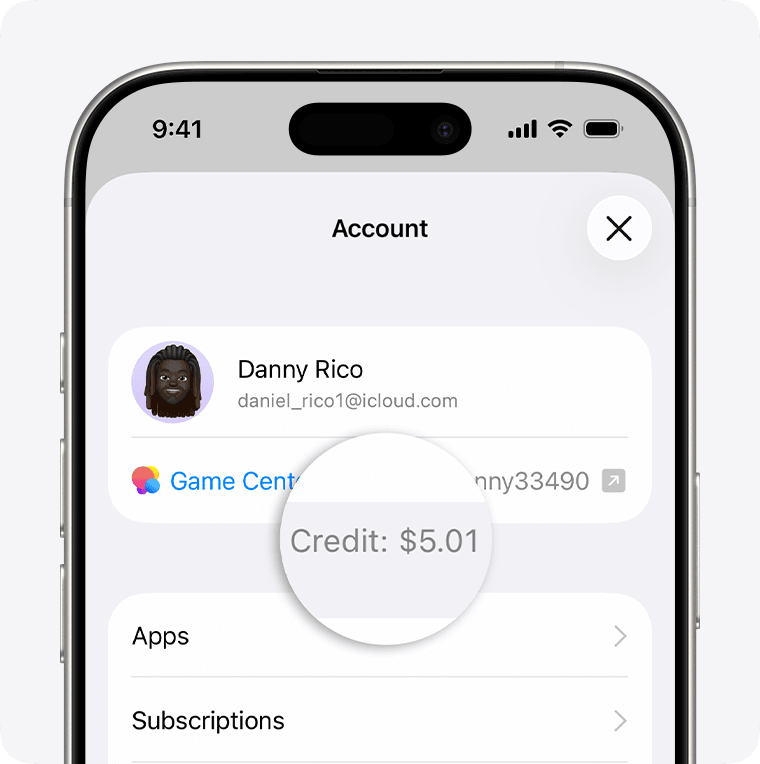
Steps to check credit:
- Open the App Store.
- Tap your profile icon in the top-right corner.
- Check the top account card directly beneath your name and Apple Account email.
- Your current balance appears here in your local currency (such as €15.00).
A blank space beneath your email indicates a balance of zero. Apple does not display a "€0.00" label; the balance line remains hidden until positive funds are added.
To top up an Austrian Apple ID, an Apple Gift Card (AT) provides a 16-digit code to add instant credit.
Alternate Route: Checking Balance via iOS Settings and Media Purchases
When the App Store app is unresponsive or caching old data, iOS Settings provides an alternate route that queries Apple billing servers directly.
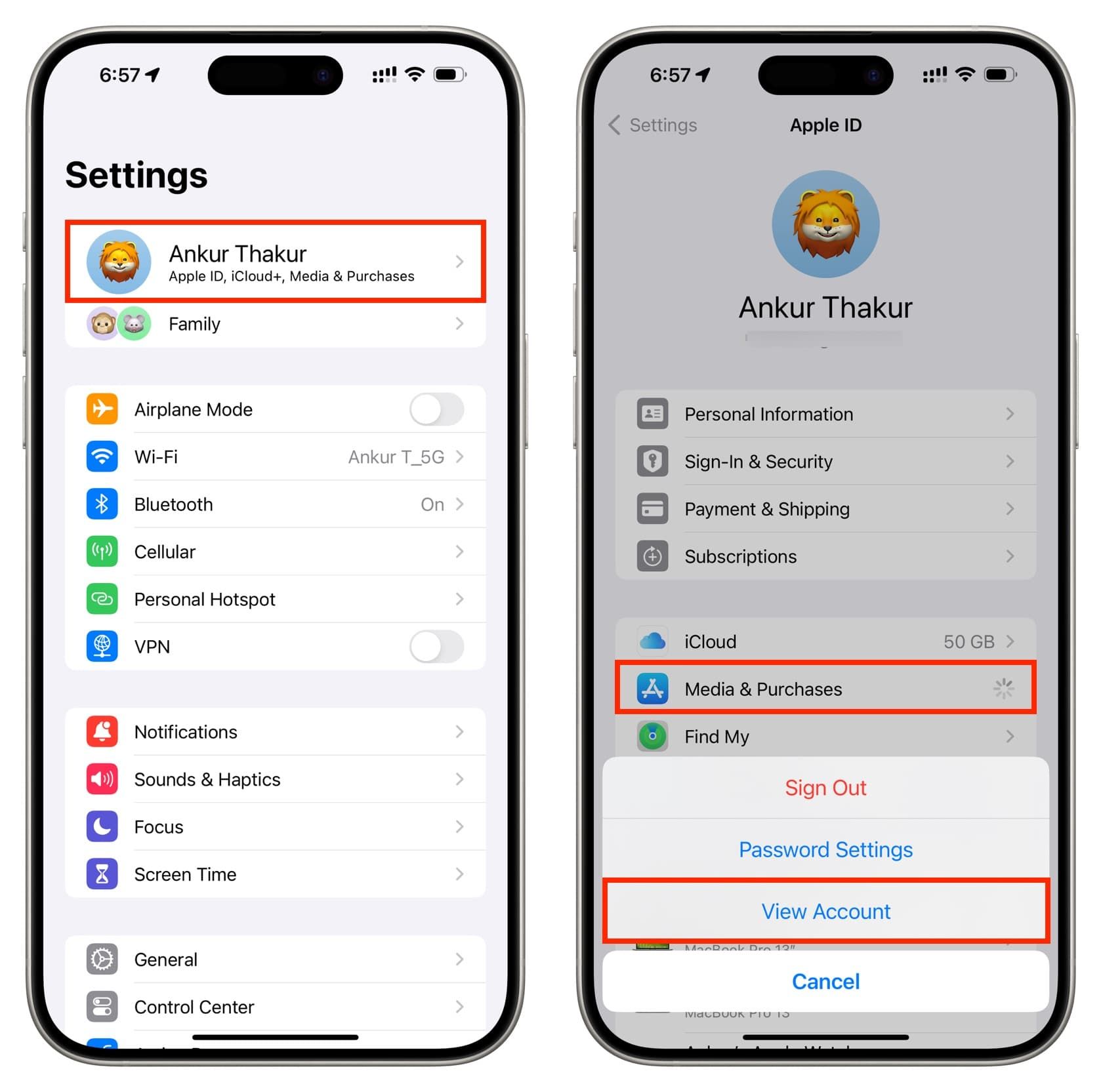
To check credit through system preferences:
- Open Settings.
- Tap your Apple Account banner at the top.
- Tap Media & Purchases.
- Select View Account on the pop-up sheet.
- Authenticate with Face ID, Touch ID, or your passcode.
- Locate Apple Account Balance beneath the Manage Payments and Country/Region rows.
| iOS Interface | Navigation Path | Visibility Behavior |
|---|---|---|
| App Store Profile | App Store > Top-Right Avatar | Shows amount directly below email; hidden if balance is €0.00 |
| iOS Settings | Settings > [Name] > Media & Purchases > View Account | Displays line item under Manage Payments after Face ID auth |
| Apple Wallet | Wallet App > Apple Account Card | Displays live balance card if enabled in supported regions |
The App Store profile offers the fastest check, while the Settings route forces a live server query to bypass local cache.
Tracking Store Credit in Apple Wallet vs Apple Cash Differences
Apple Wallet displays store funds alongside payment cards only if you have added the digital Apple Account Card in a supported region. Where available, this card reflects your App Store credit and works at physical Apple Stores.
Store balance and Apple Cash operate under completely separate rules:
- Apple Account Balance: Dedicated store credit for App Store purchases, media, and digital subscriptions.
- Apple Cash: A peer-to-peer debit system for sending money via Messages or transferring funds to bank accounts.
Funds cannot move between these balances. A €50 gift card loaded onto an Apple Account cannot be transferred to Apple Cash, withdrawn to a bank account, or spent via Apple Pay at retail terminals.
Troubleshooting: Why Apple Gift Card Balance Is Not Showing
If a voucher redemption succeeds but the updated balance does not display, check these three common causes:
1. Cached App Store UI
The App Store caches profile views locally. Background instances often fail to refresh the header automatically after a top-up.
- The Fix: Swipe up to the app switcher, close the App Store, and reopen it. If the balance remains unchanged, tap your profile icon, scroll down, select Sign Out, and sign back in.
2. The 48-Hour Refund Processing Window
Refunded store credit does not credit your account instantly. While card refunds depend on bank processing times, Apple takes up to 48 hours to restore store credit balances after approving a claim.
3. Screen Time and Content Restrictions
If the App Store icon is missing entirely, Content & Privacy Restrictions are active on the device.
- The Fix: Go to Settings > Screen Time > Content & Privacy Restrictions > iTunes & App Store Purchases and set Installing Apps to Allow.
Keep the receipt or redemption email for an Austrian Apple Store gift card until the credit confirms in your account.
Austria Region Constraints and 16-Digit Voucher Redemption Rules
Apple accounts and gift cards are region-locked. An Austrian (AT) App Store account operates in Euros (€) and will reject cards purchased in Germany (DE), the United States (USD), or the United Kingdom (GBP), regardless of shared currency.
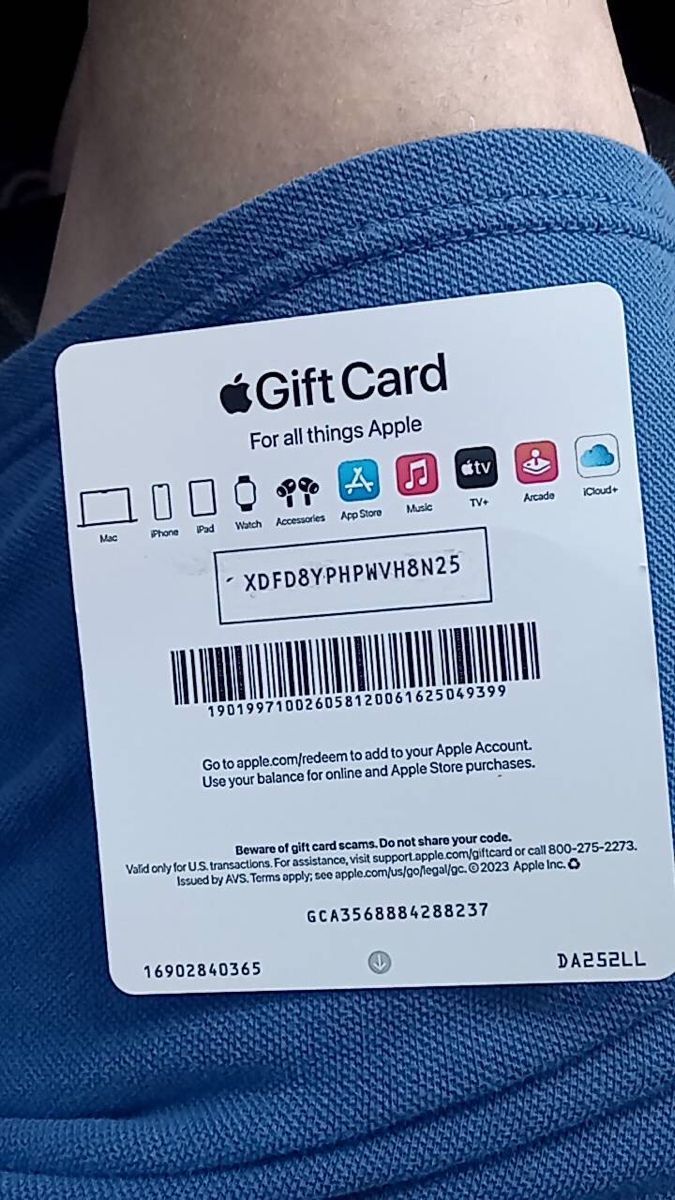
How to redeem an Austrian voucher:
- Open the App Store.
- Tap your profile icon.
- Tap Redeem Gift Card or Code.
- Scan the code with your camera or tap Enter Code Manually.
- Enter the 16-digit code starting with "X".
Redemption codes differ from card serial numbers:
| Code Type | Character Length | Starting Prefix | Redeemable in App Store? |
|---|---|---|---|
| App Store Redemption Code | 16 characters (alphanumeric) | Starts with "X" | Yes (Adds balance immediately) |
| Standard Serial Number | Variable (often 12-16 digits) | Starts with GCA | No (Record-keeping only) |
| Legacy Batch Serial | Variable | Starts with PBH or EPY | No (Retail tracking only) |
Entering serial numbers starting with GCA, PBH, or EPY triggers an invalid code error inside iOS. Only alphanumeric strings starting with X add funds to your balance.
Legacy cards labeled "App Store & iTunes" do not support web-based balance inquiries. Unlike universal Apple Gift Cards with online check tools, legacy cards reveal their value only upon redemption.
Viewing Your Credit on Mac and Windows PC Workstations
Desktop platforms sync balance data directly with Apple servers, showing the same credit attached to your Apple Account.
Checking on macOS
- Open the App Store on Mac.
- Check the lower-left corner of the sidebar.
- Active credit appears directly beneath your name and profile picture.
Checking on Windows PC
On Windows 10 and 11, use Apple's standalone desktop apps:
- Open the Apple Music or Apple TV app.
- Locate the bottom of the left navigation sidebar.
- Click your account name to view remaining store credit.
| Platform | Primary Application | UI Location | Refresh Method |
|---|---|---|---|
| iOS (iPhone/iPad) | App Store | Top-Right Profile Header | Pull down on Today tab or re-sign in |
| macOS (Mac) | App Store | Bottom-Left Sidebar | Store > Reload Page (Cmd + R) |
| Windows 10/11 | Apple Music / TV | Bottom-Left Account Name | Account > Sign Out / Sign In |
Desktop balance status reflects iOS redemptions as soon as the respective app reloads account credentials.
Spending Priority Rules and Changing Your Account Storefront
iOS applies a strict billing hierarchy to digital purchases. You cannot manually choose between account credit and payment cards during checkout.
Store credit is always billed first. If an app costs €9.99 and your balance is €15.00, Apple deducts the full €9.99 from the balance (€5.01 remaining). For a €20.00 purchase with a €15.00 balance, iOS drains the €15.00 credit and bills the remaining €5.00 to your secondary payment method.
Maintaining a balance through an official Apple Gift Card for Austria allows App Store purchases without linking a credit card.
[Purchase Initiated]
        │
        ▼
[Check Apple Account Balance]
   ├── Balance covers full amount ────► [Deduct entirely from Credit]
   ├── Balance covers partial amount ─► [Drain Credit to €0.00] ──► [Charge remainder to primary card]
   └── Balance is €0.00 ──────────────► [Charge full amount to primary card]
The Zero-Balance Region Lock Trap
Changing your Apple ID country (such as switching from Austria to another region) requires a zero balance. Apple blocks region migration if even €0.01 remains.
Because balances cannot be transferred or cashed out (except where required by law), you must clear the credit manually: spend it on an item costing more than the remaining balance (charging the difference to a card) or ask Apple Support to forfeit the remaining cents.
FAQ
Where do I see my Apple Account balance on my iPhone?
Open the App Store app and tap your profile picture or initials in the top-right corner of the screen. If you have active credit, the monetary amount appears directly below your name and email address. If no amount appears, your balance is zero.
Why is my Apple Account balance showing nothing after redeeming a gift card?
Your App Store interface likely cached the previous zero-balance state. Force close the App Store app, reopen it, and check your profile again. If it still does not show, sign out of your Apple Account inside the App Store settings and sign back in to force a server refresh.
Can I check my unredeemed Austrian Apple Gift Card balance without adding it to my account?
Universal Apple Gift Cards can be checked online via Apple's official balance check page using the card PIN. Legacy App Store & iTunes cards do not support external balance lookups and must be redeemed onto an account to verify their value.
What is the difference between Apple Account balance and Apple Cash?
Apple Account balance is store credit reserved exclusively for digital apps, media, and subscriptions in Apple's ecosystem. Apple Cash is a separate digital debit service used for peer-to-peer transfers and general Apple Pay payments. You cannot move funds between the two.
Why is my App Store missing from my iPhone home screen?
The App Store cannot be uninstalled from iOS, but it can be hidden by system settings. Check your App Library or go to Settings > Screen Time > Content & Privacy Restrictions > iTunes & App Store Purchases and confirm that Installing Apps is set to Allow.
Can I transfer my Apple Account balance to another Apple ID or bank account?
No, redeemed Apple Account balances are strictly locked to the specific Apple Account that claimed them. Funds cannot be transferred to family members, moved to a secondary Apple ID, or redeemed for cash unless required by local law.
Final Verdict: The Fastest Path to Your Apple Store Credit
Tapping your profile avatar in the App Store is the quickest way to check your available credit on iOS. If the line below your email is blank, your balance is zero. When making purchases, iOS automatically consumes this store credit before charging any linked card.
If a newly redeemed 16-digit voucher code does not update your display, signing out and back into the App Store profile clears cached data and pulls your live Euro balance from Apple's servers.

Community
Comments