

To find your Chief ID in State of Survival, tap your Avatar icon in the top left-hand corner of the main settlement screen. This opens the Chief Profile window, where your unique user ID (UID) is displayed and can be copied directly to your clipboard using the copy icon next to it.

State of Survival
- -20%
100 Diamonds
Buy NowUSD 0.97
USD 1.17
- -20%
500 Diamonds
Buy NowUSD 4.86
USD 5.83
- -20%
1000 Diamonds
Buy NowUSD 9.71
USD 11.65
- -20%
2000 Diamonds
Buy NowUSD 19.43
USD 23.32
- -20%
5000 Diamonds
Buy NowUSD 48.56
USD 58.27
- -20%
10000 Diamonds
Buy NowUSD 98.79
USD 118.55
- -20%
20000 Diamonds
Buy NowUSD 194.28
USD 233.14
- -20%
50000 Diamonds
Buy NowUSD 485.71
USD 582.85
Locating the Chief avatar on your screen
When you open the game, your base view displays various HUD elements, resource meters, and event banners. The entry point to your account details sits permanently in the upper-left corner of the interface.
- Launch State of Survival and let the main settlement screen load.
- Look at the top-left corner of your display, above your power rating and settlement stats.
- Tap your Chief's portrait frame.
Selecting this portrait immediately pulls up the Chief Profile overlay. You do not need to open your backpack, alliance menu, or mail inbox to reach this screen.
State of Survival Chief ID location inside your profile
Once the Chief Profile window opens, your character's full identity data is displayed across the interface. Your Chief ID—referred to as your UID in redemption tools—sits directly beneath or beside your display name.
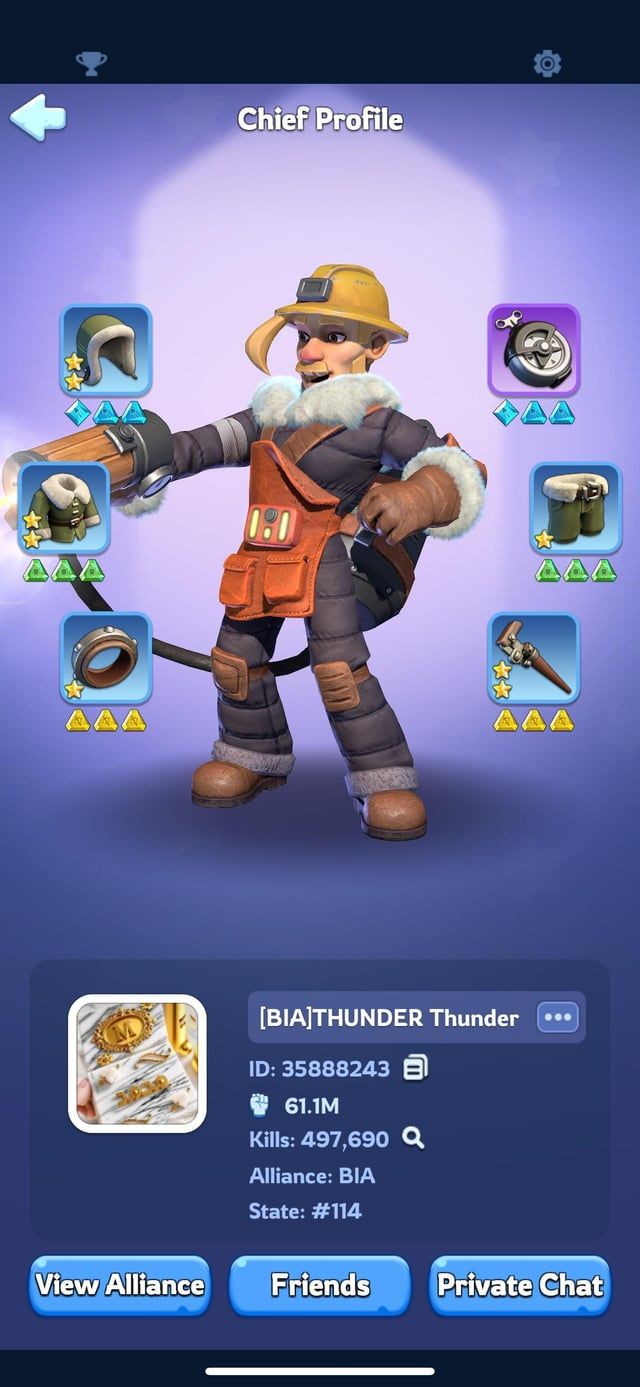
To copy the identifier without manual typing:
- Locate the string of numbers labeled as your UID or ID.
- Tap the small clipboard or copy icon situated right next to the numeric string.
- A brief confirmation prompt will indicate that your ID has been copied to your device's clipboard, as documented in BlueStacks' code guide.
If you are searching for your State number, check this same profile view. Your active server and State designation are listed alongside your Chief profile details.
Where to find account settings and redemption options
To manage your account, switch characters, or redeem codes in-game, stay inside the Chief Profile window rather than backing out to the settlement view.
According to the official State of Survival PC FAQ, tapping your avatar in the upper-left corner opens the Chief Profile, where you can then tap SETTINGS in the lower right-hand corner.
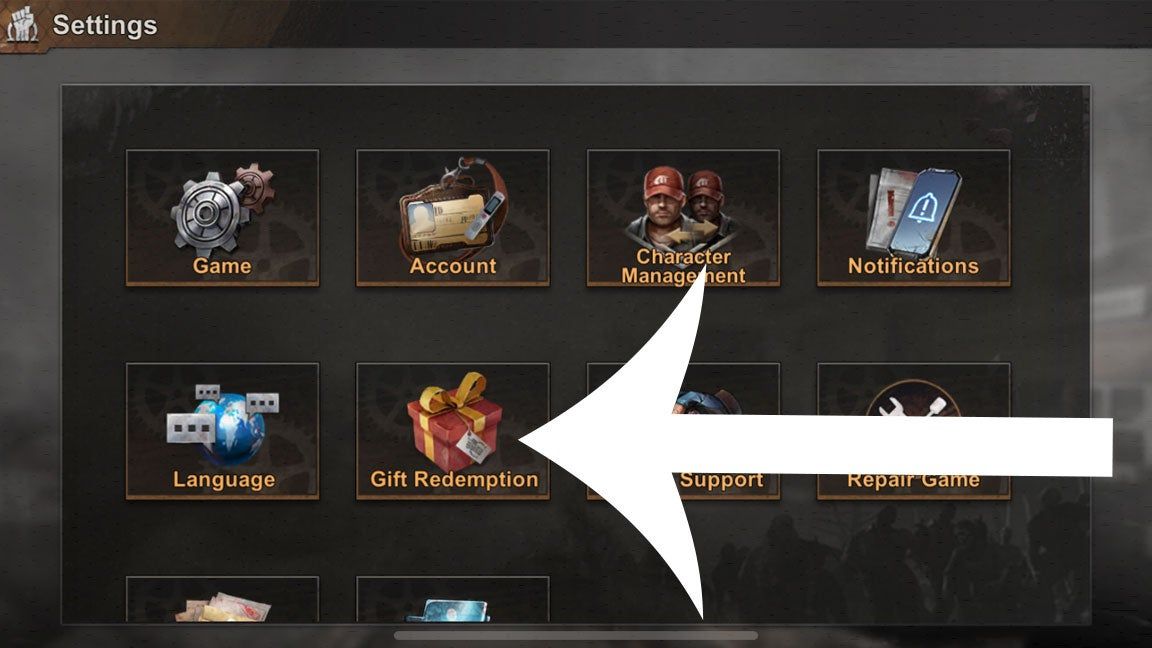
This settings sub-menu contains several critical utilities:
- Account Management: Link your profile to external credentials or switch accounts.
- Support and Ticket Submission: Contact customer service with your Chief ID pre-populated.
- Gift Redemption: Enter promotional codes directly within the mobile application.
How gift code redemption methods differ
How you submit your Chief ID depends on whether you redeem rewards inside the game client or through an external browser portal:
| Method | Where to Go | How Chief ID Is Used |
|---|---|---|
| In-Game Redemption | Chief Profile → Settings (lower right) → Gift Redemption | The game automatically identifies your account; you only enter the redemption code (VG247). |
| External Web Portal | Official redemption website via browser | You must manually paste your copied UID and enter your State number to route rewards (BlueStacks). |
Note that while Whiteout Survival shares similar Chief terminology and interface layouts, State of Survival is a distinct post-apocalyptic zombie strategy MMO developed by KingsGroup and published by FunPlus. Ensure you are using a State of Survival redemption portal when pasting your ID.
Security rules when sharing your Chief ID
Your Chief ID functions as a public account identifier. It is required when receiving external rewards, coordinating with customer support, or purchasing Biocaps through external platforms such as State of Survival on NXPGame.
Legitimate external top-up services and support staff only require your Player ID and server information to deliver goods or investigate account issues. Never share your account password, email login credentials, or verification codes with anyone under any circumstances.

Community
Comments