

Redeeming a Roblox gift card provides a better return than checking out directly through mobile app stores, as Roblox officially grants up to 25% more Robux for transactions completed via gift cards, web browsers, or computer clients. By routing redemption and account balance upgrades outside Apple's App Store and Google Play, players avoid mobile platform distribution markups and receive exclusive monthly virtual avatar items alongside their balance.

Roblox Gift Card US
Platform Fees and the Up to 25% Robux Bonus
Purchases made inside the Roblox app on iOS or Android process through Apple's App Store or Google Play, both of which take a platform commission from developers on digital transactions.
To encourage players to purchase away from mobile platforms, Roblox instituted a long-term policy granting up to 25% more Robux whenever transactions occur through web browsers, computer desktop clients, or prepaid cards. A Roblox spokesperson confirmed this initiative to TechCrunch, explaining that players choosing alternative direct paths receive higher currency amounts per transaction rather than surrendering value to mobile checkout systems.
Spending identical amounts on the website or via prepaid codes yields more currency than mobile checkout. In-app purchases offer one-touch convenience, but at the cost of a smaller total Robux balance.
How Roblox Credit to Robux Conversion Works
Using a prepaid card involves an intermediate step that many parents and players overlook. When you purchase a Roblox Gift Card US or redeem a digital code, the code does not always drop instant Robux directly into your account upon entering the characters.
Instead, cash-denominated gift cards deposit as Roblox Credit at the redemption page. As documented by Rewordin, this account credit is browser-only. You cannot view your credit total inside standard mobile apps, nor can mobile checkout menus pull directly from that credit balance.
To transform your credit into usable in-game currency, you must complete the transaction inside a desktop or mobile browser:
- Sign in to your account through a web browser.
- Open
roblox.com/redeemand submit your digital PIN. - Verify that your balance shows the newly credited face value.
- Select the option to convert the credit directly into Robux or use it on the upgrades page to purchase Roblox Premium.
Skipping this conversion leaves your funds sitting idle as credit. If you open your mobile game client immediately after redeeming without converting on the site, your Robux balance will appear unchanged.
Robux Yield by Card Tier and Web Comparison
Gift card redemption values align with standard baseline packages while attaching bonus cosmetic items that direct in-app taps never supply. The baseline redemption rates documented across third-party sources and distributors such as TURGAME outline what players receive at specific face-value tiers.
| Denomination Tier | Robux Yield and Included Bonuses | Baseline Details and Source Citation |
|---|---|---|
| 10 Card Tier | Around 800 Robux (+ monthly bonus virtual item) | Standard base redemption yield documented by TURGAME. |
| 25 Card Tier | Around 2,000 Robux (+ monthly bonus virtual item) | Standard base redemption yield documented by TURGAME. |
| 50 Card Tier | Around 4,500 Robux (+ monthly bonus virtual item) | Standard base redemption yield documented by TURGAME. |
| 100 Card Tier | Around 10,000 Robux (+ monthly bonus virtual item) | Standard base redemption yield documented by TURGAME. |
| Web Direct Baseline (Comparable to 10 Tier) | 1,000 Robux | Direct web catalog tier without subscription discounts reported by Eneba. |
Card redemptions also grant an exclusive virtual avatar item that rotates each month. Direct mobile purchases deliver only the raw currency pack.
Mobile App Redemption Limits and Workarounds
Many buyers run into friction trying to enter a code inside the mobile application. The standard Roblox client on Apple iOS and Android does not provide a redemption portal for gift codes.
There is a direct contradiction in player guides regarding this feature. A guide from TURGAME claims mobile app users can find a "Redeem Roblox Card" button under the app's Robux menu. Conversely, detailed platform breakdowns from MyGiftCardSupply state that card redemption is completely absent from standard mobile apps and consoles.
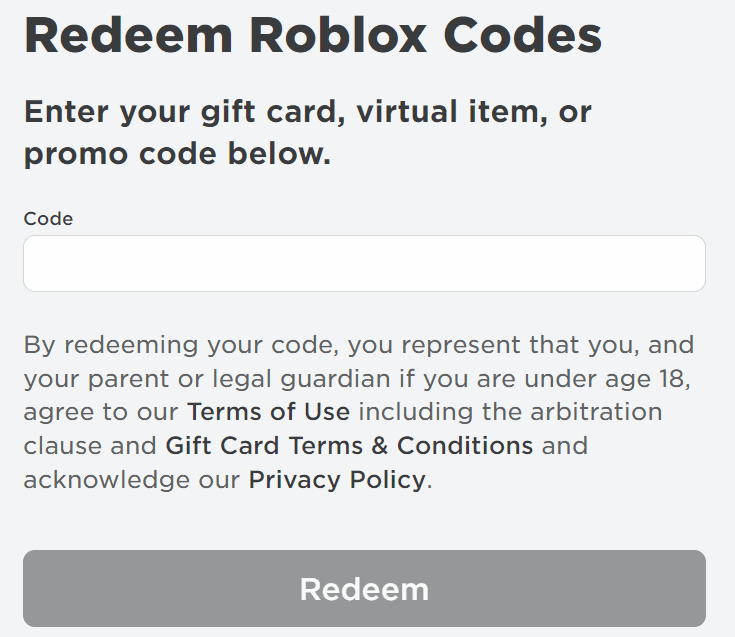
The only documented exception on mobile devices applies to Samsung Galaxy hardware, which features an integrated redemption interface inside its tailored client. For all other phones, tablets, and gaming consoles, you must close the native game client, launch Safari or Chrome, and perform the redemption at roblox.com/redeem.
Account Region and Currency Conversion Rules
Regional account configuration dictates whether an alternative prepaid code will process without errors. Retail sources present conflicting reports on how cross-border gift cards function:
- Region-locked policies: Sources including TURGAME and MyGiftCardSupply indicate that Roblox gift cards maintain geographic restrictions tied strictly to the registration location of your account. Under this rule, a United States digital card requires an account registered in the United States.
- Automatic foreign exchange: An alternative retail claim states that codes lack geographic locks and convert internationally based on XE.com foreign exchange rates.
Because of this verified disagreement across market sources, the safest practice is matching the card's stated region directly to your account's regional settings. A Roblox Gift Card US is officially meant for accounts registered within the United States. Attempting to redeem foreign denominations against accounts based elsewhere risks technical errors or rejected codes at checkout.
Deciding Between In-App Purchases and Gift Cards
Choosing between an in-app tap and a prepaid card comes down to whether you prioritize immediate checkout speed or total currency yield.
Choose direct mobile in-app purchases if: * You need instant Robux inside an active game session without leaving the client. * You want payment handled entirely through your stored Apple ID or Google Play balance. * You do not want to manage extra steps like browser log-ins or credit balance conversions.
Choose prepaid gift cards if: * You want the maximum currency volume, taking advantage of policies granting up to 25% more Robux outside mobile app stores. * You collect monthly promotional avatar accessories and virtual cosmetics. * You are a parent managing spending limits without attaching a live credit card to a child's mobile device. * You hold an account registered in the matching country region.
Frequently Asked Questions
Why does buying Robux with gift cards or on the web yield more currency than mobile apps?
Roblox provides up to 25% more Robux for web, computer, and gift card redemptions to bypass the platform commission fees collected by Apple and Google on native mobile in-app transactions, as reported by TechCrunch and Yahoo Finance.
Can I redeem a gift card directly inside the Roblox iOS app?
No. The standard Roblox mobile application on iOS and Android does not contain a card redemption box. You must navigate to roblox.com/redeem in an external browser, unless you use a Samsung Galaxy device which includes a specific in-app redemption option according to documentation from MyGiftCardSupply.
Does redeeming a gift card immediately add Robux to my total?
Redeeming a currency card deposits funds as Roblox Credit rather than instant Robux. You must perform an additional manual step on the redemption or upgrades page in a browser to convert that stored credit balance into Robux or a Premium subscription, as detailed by Rewordin.

Community
Comments