

Stop looking for sliders that do not exist. Optimize your HUD and sensitivity in Watcher of Realms 2026 with this practical, no-nonsense guide to true settings control.
Community boards buzz weekly with complaints about sluggish watcher of realms sensitivity or requests for HUD editors to move skill buttons. Players expect menus full of Hud Customization options, camera distance sliders, and UI toggles. They carry over muscle memory from FPS and MMORPGs. That expectation clashes with the game’s actual build.
Watcher of Realms is a mobile tower-defense RPG by Moonton. You manage hero collection, strategic placement, and gacha mechanics. Inputs are dragging fighters to lanes and tapping icons for ultimates. No crosshairs. No mouse look. The watcher of realms control scheme relies on battlefield geometry, not cursor precision. Ignore non-existent sliders; optimize the settings that exist. Grab a clean account setup from this official game storefront for a fresh slate while applying these tweaks.

Watcher of Realms
- -40%
499 W Gold
Buy NowUSD 4.77
USD 6.68
- -40%
999 W Gold
Buy NowUSD 9.55
USD 13.37
- -40%
1999 W Gold
Buy NowUSD 19.11
USD 26.75
- -40%
2999 W Gold
Buy NowUSD 28.67
USD 40.14
- -40%
4999 W Gold
Buy NowUSD 47.79
USD 66.90
- -40%
9999 W Gold
Buy NowUSD 95.59
USD 133.82
- -40%
29999 W Gold
Buy NowUSD 285.84
USD 400.17
- -40%
59999 W Gold
Buy NowUSD 572.63
USD 801.68
The Truth About In-Game Sensitivity
No in-game mouse sensitivity setting exists. None. On mobile, the concept does not apply. On PC via emulator, adjustments happen outside the game client.
Confusion stems from FPS habits. Aim assist smooths tracking in console shooters like Overwatch. Watcher of Realms lacks aim assist because it lacks aiming. You place units; targets lock in.
PC users rely on external keymapping tools. The emulator translates mouse clicks into touch inputs. Your Sensitivity Optimization happens in emulator config, not game menus. Adjust pointer speed and mapping zones there for snappier skill taps. The game menu offers zero cursor speed or HUD scaling options. The interface is fixed.
Why There Is No HUD Editor
Players seeking watcher of realms hud layout options confuse this title with RPGs like World of Warcraft or Final Fantasy XIV. Those games feature Edit Modes and third-party add-ons for UI modification. You can drag health bars, resize action bars, and change opacity.
Watcher of Realms supports no third-party HUD add-ons. It is mobile-first with a static UI. Buttons stay put. The minimap stays put. You cannot move the hero deployment tray or shrink the pause menu.
You can change how you use screen real estate. Strategic positioning is the primary "HUD" interaction. Placing fighters to block enemies while keeping damage dealers behind them is critical. Unlike shooters where HUD overlays action, the battlefield itself is the interface here. Misplacement leads to overwhelmed frontlines and immediate loss. Focus on lane geometry, not pixel-shifting health bars.

Keybinds and PC Emulator Mapping
The in-game menu offers no watcher of realms keybinds customization. PC players must build control schemes using external mapping. This improves reaction time. Mobile players deal with touch targets; PC players assign physical keys to those coordinates.
I map four primary skill buttons to E, R, F, and G. I keep the cursor parked over the screen center, where action happens, rather than dragging it to the bottom UI bar. Precise mapping zones in your emulator make this flow possible. You no longer break your gaze from the enemy wave to activate a cooldown.
The Tactician class, introduced in July 2025, adds complexity. Tacticians change positions on the battlefield for buffs. Mapping deployment drag-and-drop to a keyboard modifier, or using a macro to snap units to coordinates, saves seconds during chaotic waves. The emulator enhances precision in ways the base mobile game cannot, despite zero native support.
The Auto-Skill Activation Gap
Mechanical frustration impacts gameplay flow: no auto-skill activation for new stages. The game features auto-battle, but strictly for cleared stages. Even then, it does not auto-cast skills.
You must manually trigger abilities. This forces constant input during progression. You cannot press play and watch numbers rise on a first-time clear. You must tap. This design keeps engagement high and pacing deliberate. Your watcher of realms settings guide must address managing attention during mandatory manual inputs.
Train yourself to watch enemy spawn intervals, not hero health bars. Visual processing splits because you manually fire skills. On PC, setting up a macro key for "Cast All" (if your emulator supports simultaneous coordinate tapping) relieves mechanical fatigue. It is a workaround for a missing native feature.
Managing Game Speed and Farming Efficiency
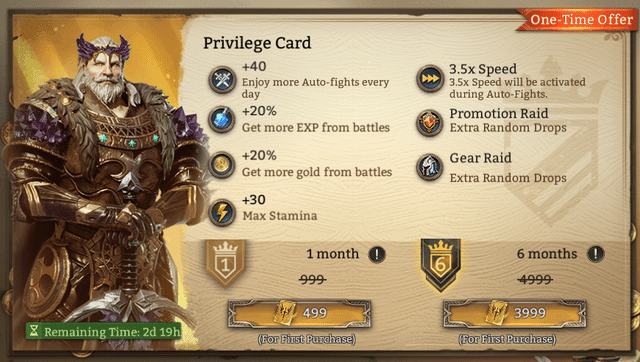
To speed through cleared content, understand the Privilege Card. This VIP Pass unlocks higher speed settings during auto-fights. Without it, farming efficiency caps at standard speed. With it, you utilize 3.5x game speed.
The 3.5x option is locked behind the Privilege Card: $4.99 for the first month, $9.99 monthly thereafter. This pass is required for higher auto-fight speeds, impacting farming efficiency for veterans catching up on materials.
Pricing breakdown:
| Feature | Cost (Month 1) | Cost (Subsequent) | Benefit |
|---|---|---|---|
| Standard Speed | Free | Free | 1x Auto-battle Speed |
| Privilege Card | $4.99 | $9.99 | Unlocks 3.5x Auto-battle Speed |
Takeaway: The math is simple. If you are progressing through new stages, this pass is useless. You cannot use 3.5x speed on uncleared stages, and you still manually tap skills. Buy only when your main account is pushed and you run loops for resources.
Arena Rewards and Resource Management
Optimization extends to farming targets. A recent update adjusted Arena weekly settlement rewards. If grinding Arena for Diamonds, know the current numbers; they scale heavily with rank.
The update also adjusted chest contents, adding Diamonds and Summoning Crystals while removing Gold and EXP Potions. Arena chests are now strictly premium currency and summoning materials. You cannot rely on them to level low-rarity heroes.
Exact breakdown of Arena reward changes:
| Rank Tier | Previous Reward | Current Reward | Change |
|---|---|---|---|
| Bronze I | 50 Diamonds | 100 Diamonds | Doubled |
| Apex Overlord | 800 Diamonds | 1000 Diamonds | Increased by 200 |
Takeaway: Bronze players get double starting Diamonds. Apex Overlord players get an extra 200 Diamonds a week. If struggling to afford pulls, climbing out of lowest tiers increases passive income fastest.
Beyond Arena, manage currency coldly. The game features over 200 heroes across 10 factions. You will pull duplicates. Selling rare heroes yields exactly 30 Diamonds each. It is a consistent source of premium currency. Sell any rare hero you do not plan to awaken or use in secondary comps. The economy favors players who liquidate dead weight for Summoning Crystals.
Code Redemption and Account Setup
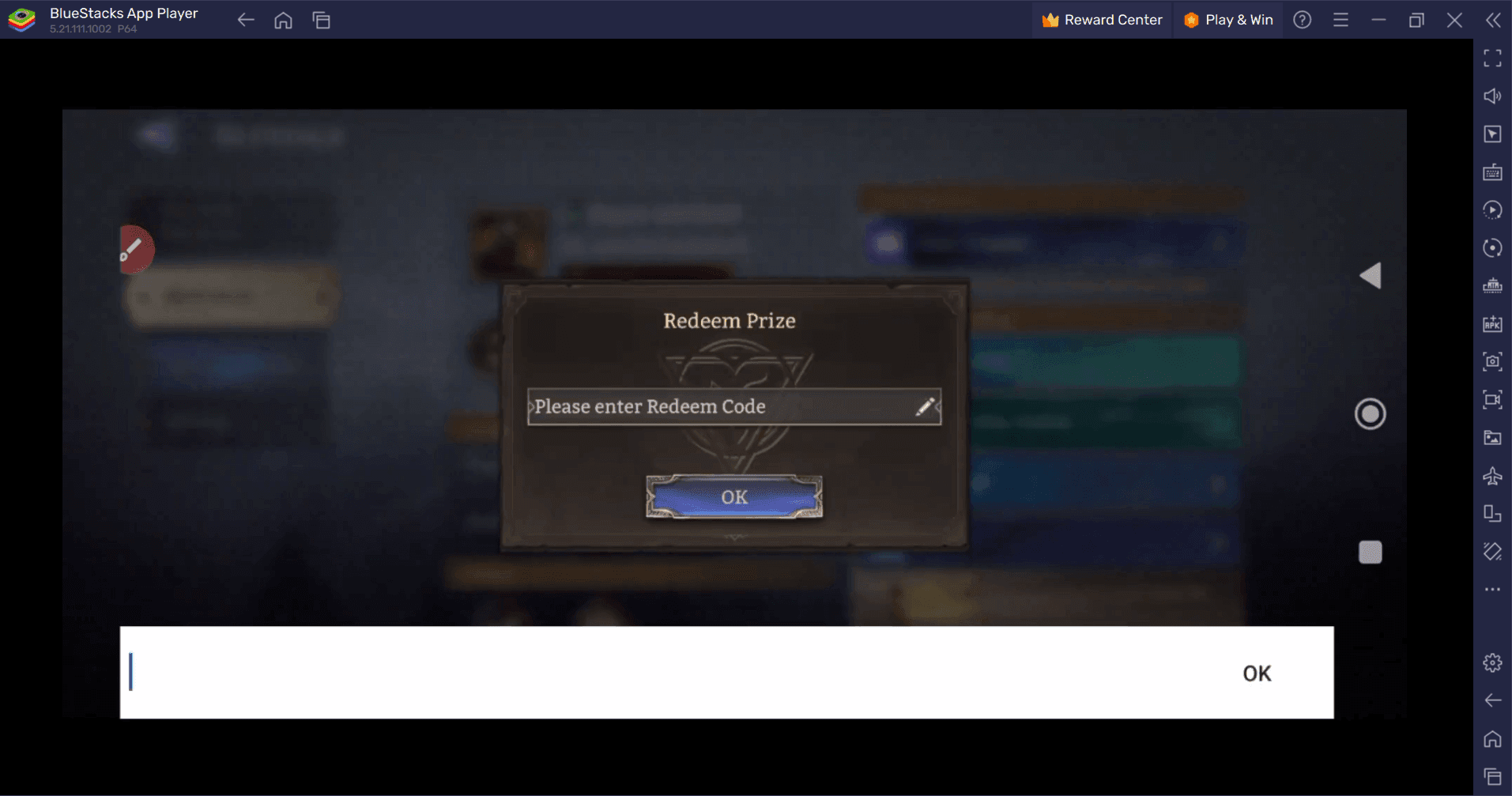
Daily routines involve freebies. Codes and rewards distribute via the in-game mailbox. Redemption requires case-sensitive entry through Profile > Settings > Redeem Code.
As of August 20, 2026, active codes include FREEEPIC3RD and WOR3RDANN1, providing Diamonds and Summoning Crystals. Redeem these immediately upon setting up a new account. Because the game lacks watcher of realms hud customization options, you might feel a lack of agency. But you have agency over resource allocation. To ensure you have heroes for testing deployment strategies, top up for your account safely through the game's storefront.
Understand the pity system. Limited Banners guarantee a featured hero at the 200th pull. Ancient Summoning guarantees a Lord Hero at 200 pulls. These systems are crucial for long-term resource management. Do not spend Diamonds on standard banners if building a specific team. Save for Limited Banners for meta heroes.
The Black Market is a critical daily stop. It offers Rare Summoning Crystals at below-standard Diamond rates. Buying these daily is recommended for efficient progression. Unlocking Black Market slots is high-ROI Diamond spend in your first 30 days. Wasting early Diamonds on cosmetic or standard refresh options stalls hero acquisitions by week four.
The Recommended Control and Settings Profile
If setting up a brand new account today, configure the experience as follows. This profile assumes PC via emulator; mobile players are stuck with base touch controls.
- Emulator Pointer Speed: Set OS mouse speed to 6/11. Match emulator internal pointer speed. This ensures 1:1 cursor mapping without artificial acceleration.
- Keybind Mapping: Open emulator keymapping. Map primary deployment slots (empty battlefield squares) to left hand keys (A, S, D, W). Map ultimate ability buttons (circular icons at bottom UI) to E, R, F, G.
- Camera/Screen Lock: Disable emulator "Mouse Lock." You need to drag the camera slightly to check battlefield edges, especially when managing Tactician heroes who move dynamically.
- Audio Cues: Turn in-game audio effects to 100%. Without customizable HUD warnings, rely on sound design. The audio cue for an enemy spawning behind your frontline is your primary defense.
- Notifications: Turn off push notifications entirely. The game requires manual skill casting. A missed tap due to a notification banner obscuring the bottom UI costs a stage rating.
- Frame Rate: Cap emulator at 60 FPS, or 240 FPS if hardware handles it. The game supports up to 240 FPS via PC emulators, requiring at least 4 cores and 4GB RAM. Higher frame rates smooth deployment drag-and-drop.
When to deviate: If playing a Tactician-heavy team, re-map keyboard so movement command is on mouse click, and deployment slots are on keyboard. Tacticians require active repositioning for buffs, needing quick, fluid movement inputs rather than static placement.
Final Verdict: Stop Chasing the Sliders
Searches for watcher of realms best sensitivity yield no magic number. You cannot tweak a slider to double deployment speed. That does not exist.
The game is a static, mobile-first interface. Controls are basic. Real optimization is mental: understanding lane geometry, timing manual skill activations, and managing Diamonds to hit the 200-pull pity threshold.
Aim assist and mouse sensitivity are illusions in a tower-defense RPG. Focus on keybinds if on PC, respect auto-cast limitations, and spend resources wisely on the Black Market and Limited Banners. If you want to explore the gacha side with a healthy Diamond balance, find the right package for your account here.
Master the battlefield, not the menu. That is the only watcher of realms settings guide you need.
FAQ
Does Watcher of Realms have mouse sensitivity settings?
No, Watcher of Realms does not have in-game mouse sensitivity settings. If playing on PC via an emulator, you must adjust sensitivity using the emulator's keymapping or configuration tools. The game itself operates on a fixed, static interface with no sliders for cursor speed or camera panning.
Can I customize the HUD in Watcher of Realms?
No, the game does not offer a built-in HUD editor for moving or resizing UI elements. The interface is fixed, and customization is strictly limited to hero placement, team composition, and external emulator keymapping. You cannot move the skill buttons or change the opacity of the minimap.
How do I redeem gift codes in Watcher of Realms?
Tap your profile icon, select Settings, then Redeem Code, and enter the case-sensitive code. Rewards are delivered directly to your in-game mailbox. Be sure to check active codes like FREEEPIC3RD and WOR3RDANN1, though availability changes frequently.
Is there an auto-battle feature in Watcher of Realms?
Yes, but it is only available for stages you have already cleared. It does not auto-cast skills, requiring manual input for new progression. You must still sit and tap your ultimate abilities during an auto-battle run, which prevents it from being a true "hands-off" feature.
What is the Tactician class?
Added in July 2025, Tacticians can move around the battlefield to gain buffs. They provide unique support and control capabilities compared to static classes. They add a layer of strategic movement that requires active management during waves.
How much does the Privilege Card cost?
The first month costs $4.99, and subsequent months cost $9.99. It unlocks the 3.5x game speed option during auto-fights. This is a necessary purchase for veteran players who are heavily reliant on farming cleared stages for materials.
Can I use third-party add-ons to change the UI?
No. The game does not support third-party add-ons for HUD modification, unlike PC MMOs. It relies on its fixed interface. Any visual modifications you make must be handled at the emulator level, and even then, you are just mapping inputs, not changing the actual game UI.
What are the best PC specs for running the game smoothly?
PC system requirements for running WoR via emulators include 4 cores and 4GB RAM, with support for up to 240 FPS. Emulators allow for higher frame rates and larger screen interaction than mobile devices, making the deployment process much easier to manage visually.

Community
Comments