

Can't find the number the voucher form wants? Here's the exact Settings path on phone and emulator, plus which lookalike IDs you should never paste.
I refuse to paste a nickname into a voucher form. Arena of Valor is a mobile 5v5 MOBA from Level Infinite, TiMi Studio Group, and Garena. Vouchers are the premium currency for heroes and skins. The form wants the Player ID: not the name over your head, not a Facebook number, not last night's match code.
If you play Garena AOV in Indonesia and you are about to buy AOV ID vouchers for yourself or a friend, open Settings first. Two minutes here beats a gift that lands on a stranger.

Arena of Valor (ID) Vouchers
- -3%
40 Vouchers
Buy NowUSD 0.66
USD 0.68
- -3%
90 Vouchers
Buy NowUSD 1.32
USD 1.36
- -3%
230 Vouchers
Buy NowUSD 3.28
USD 3.38
- -3%
470 Vouchers
Buy NowUSD 6.57
USD 6.77
- -3%
950 Vouchers
Buy NowUSD 13.13
USD 13.53
- -3%
1430 Vouchers
Buy NowUSD 19.71
USD 20.30
- -3%
2390 Vouchers
Buy NowUSD 32.85
USD 33.83
- -3%
4800 Vouchers
Buy NowUSD 65.70
USD 67.67
- -3%
24050 Vouchers
Buy NowUSD 328.52
USD 338.38
- -3%
48200 Vouchers
Buy NowUSD 657.05
USD 676.76
The Settings path that actually shows the Player ID
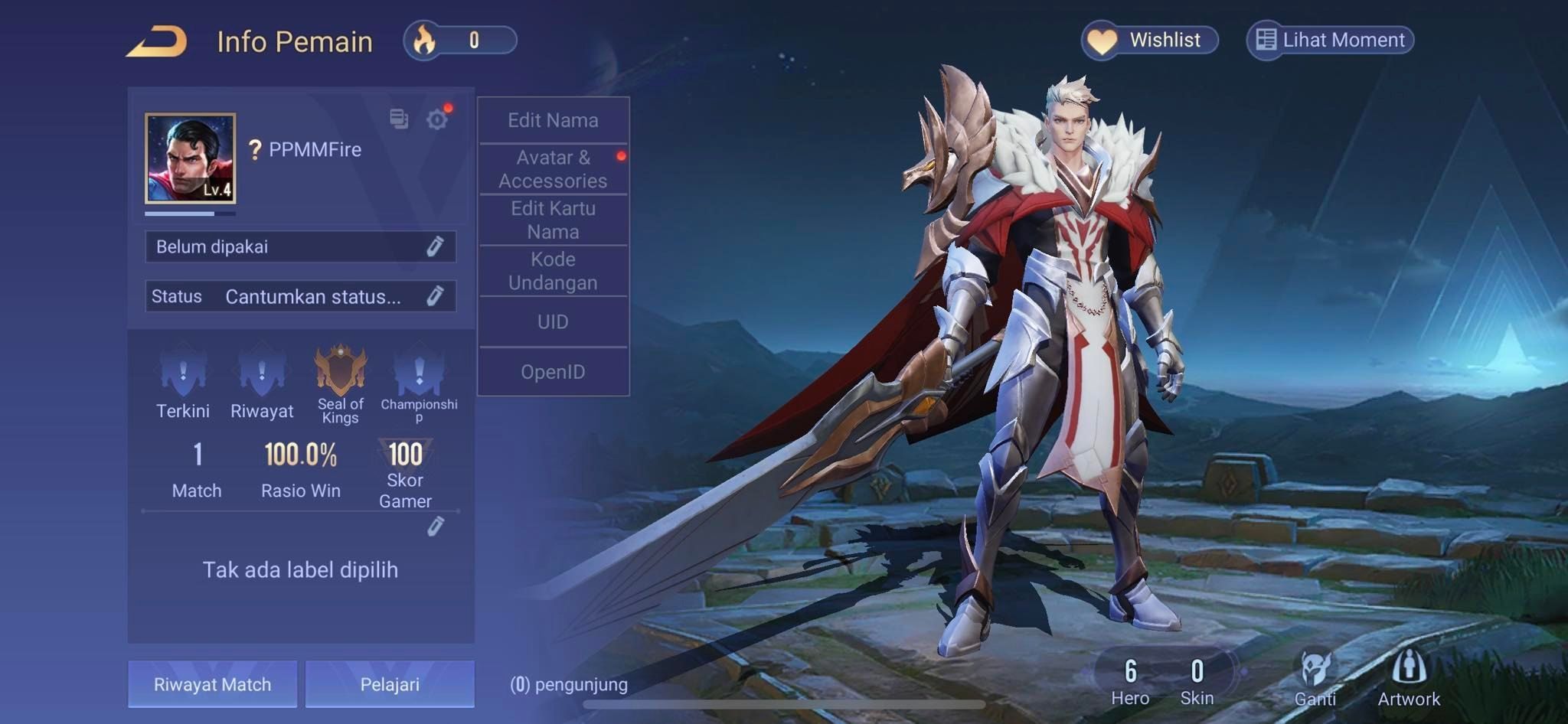
Log into the account you actually play on, then open in-game Settings. Scroll to the bottom and tap Player ID. The number appears on that screen. Copy it. Do not retype it from memory.
Settings, bottom of the list, Player ID. Anyone who pointed you at the profile banner or a ranked recap sent you a different string. I only paste what that Settings tap shows.
If the list looks empty, you are not scrolled far enough, or you opened a graphics submenu. Return to the root Settings page. The Player ID row sits under the options people never touch. Guest accounts have one too. Bindings do not hide it.
Write the digits down if your phone will not copy from the overlay. I still do that for gifts. Paper does not turn a 0 into an O.
Phone, iPhone, and emulator screens
The menu is the same client. The taps are not.
On Android, Settings is the gear on the home or profile cluster. One long scroll, then tap Player ID. Long-press the digits if the device allows it; otherwise use the paper method. Android keyboards also like to insert a space in a long number, so strip every space before you submit the form.
On iPhone the path is the same, with two Apple-specific annoyances. The gear can hide behind the notch, so swipe the home HUD once if you do not see it. iOS also captures a screenshot when you press too long. Use the in-game copy control if one appears. Otherwise type the ID into Notes, then paste from Notes into the voucher field. Do not hold the number in your head between apps.
Emulators add a third trap. The mouse makes it easy to open the battle-pass panel that sits next to Settings. Full-screen the window so the bottom of the Settings list is actually on screen. Overlay tools print ticket numbers that look official. Those are not a Player ID.
Indonesia does not get a special menu. Garena AOV ID uses the same Settings entry as other Garena regions. The difference is the server the account lives on, not the button you press.
Player ID is not your nickname
Nickname versus Player ID is the mix-up that burns gifts. Your nickname sits over the avatar. You can change it. The Player ID does not move when you rename. A store will not resolve a nickname, even a unique one.
The Garena login ID is the second trap. The Garena account is the login wrapper: Facebook, guest, or whatever you bound. That login can exist on more than one regional server. The Player ID is the in-game profile on one server. Paste the Garena string and the form has nothing it can credit.
Match IDs look official. They are long, they sit on recap screens that feel important, and they name a match, not a person. Send a crop of Settings, not a victory screen.
A wrong Player ID fails quietly. The order can still close on the store side and land on a profile you do not own, or bounce because the number does not exist on the Indonesia server. Either way you are arguing about a digit you should have copied from Settings.
I keep this next to the checkout field.
| Lookalike | Why it gets pasted | Safe for vouchers? |
|---|---|---|
| Nickname | Friends search it | No |
| Garena or Facebook account ID | It is the login | No |
| Match or replay ID | It looks like a serial | No |
| Player ID in Settings | It is the server profile | Yes |
If the form rejects the number, do not swap in a longer ID from a recap. Go back to Settings and copy again.
Indonesia server lock and the Facebook trap
Account data does not move across regions. If you play Garena AOV Indonesia, the Player ID you paste must belong to that Indonesia profile. A Thailand or Vietnam ID will not receive Indonesia Vouchers. There is no transfer ticket.
Indonesia is not a side server. Interest scores put Costa Rica at 100, Vietnam at 80, and Indonesia at 40, with Bangladesh and the Philippines tied at 20. That 40 keeps Indonesian checkout forms busy, and busy forms hide sloppy IDs.
| Region | Interest score | Note |
|---|---|---|
| Costa Rica | 100 | Highest regional search interest score |
| Vietnam | 80 | Second highest regional search interest score |
| Indonesia | 40 | Third highest, and the server this guide is for |
| Bangladesh | 20 | Tied for fourth highest regional interest score |
| Philippines | 20 | Tied for fourth highest regional interest score |
You are not hunting a rare ID format. You are hunting the correct ID on a crowded server.
Garena AOV has passed 10 million Android downloads and 3.3 million on iOS. Daily active estimates run from 567,000 to 1 million. Plenty of profiles, and plenty of ways to gift the wrong one.
| Platform metric | Figure | Note |
|---|---|---|
| Google Play downloads | 10,000,000+ | Android client |
| App Store downloads | 3.3M+ | iOS client |
| Daily active players | 567K–1M | Estimate across mobile |
| Indonesia interest score | 40 | Third in that regional ranking |
A mistyped digit is not an obvious error at this scale. The form can still match a profile.
Facebook binding is permanent. Once a Facebook account is linked to an AOV profile, that link does not come off. You cannot swap a different Facebook in later. The same Facebook login can bind one profile per server. Useful if you truly play two regions. A disaster if you thought you were opening the Indonesia one.
If the Facebook app on the device is logged into a different person, launching AOV can load or create the account tied to that session. Log out from in-game Settings. Confirm the Facebook app is on the right profile. Relaunch, then copy the Player ID only after you see your real rank and hero list.
What I would spend after the ID is correct
Vouchers buy heroes and skins. I would not open a pack list until the Player ID sits in a note on the same device I will check out from. Then I pick a pack that matches how I play, not how a streamer plays.
F2P: one small voucher pack, spent on a hero you already grind or a skin you will see every ranked night. If you still bounce between three roles, skip the purchase. A wrong-role skin is how light money vanishes.
Mid spend: enough Vouchers for one missing hero plus one skin you will not hide. I would rather finish one hero's look than sprinkle currency across five half-done cosmetics. Check the live Arena of Valor Indonesia vouchers list for current pack sizes before you decide. Prices move. That page is the source, not this article.
Heavy: you already know the roster. Buy the pack that covers the next skin line you main. Do not stockpile on a second Player ID you found in an old screenshot. One profile. The Indonesia one. The Settings one.
I lean toward the mid pack for gifters. F2P friends rarely name the skin they want. Heavy packs feel generous until they land on the wrong ID. Mid is enough to matter and small enough that a second look still feels worth it.
Most checkout screens show the total before you pay. Use that screen as a pause. Read the Player ID back, digit by digit. Then pay. Live checkout on nxpgame answers which methods your country can use. I will not print a list that goes stale next week.
What a real form asks versus a scam
A legitimate voucher checkout asks for the Player ID and the server or region, then shows the pack and the total. That is the list. It does not need your Facebook password. It does not need remote access. It does not need a screenshot of SMS codes.
A scam asks for the login, a temporary bind, or an authenticator code. Some want a Garena account ID because that string is easier to lift from a login email. If the form wants anything that can take the account, close it.
Fake urgency is another tell. The Player ID does not expire because you waited ten minutes to confirm a digit. Crop a Settings screenshot for a gifter. Do not send a photo of your whole desktop with mail open.
FAQ
Where can I find my Arena of Valor Player ID?
Log into the game, open Settings, scroll to the bottom, and tap Player ID. The ID displays on that screen. Copy it from there and ignore every other number the client shows you.
Can I transfer my Arena of Valor account data or vouchers to another server?
No. Account data is locked to its server. Indonesia Vouchers stay on the Indonesia profile whose Player ID you entered. If you main another region, you need that region's ID and that region's product.
What should I do if Facebook opens the wrong AOV account?
Log out from Settings, then switch the Facebook app to the profile you actually play on. Relaunch AOV and choose Facebook Login. Copy the Player ID only after you see your real name, rank, and heroes.
Is Facebook account linking permanent in Arena of Valor?
Yes. Once Facebook is bound to a profile, you cannot unlink it or attach a different Facebook account. Bind the right one on purpose. One Facebook login holds one game account per server, not several on the same server.
What happens if I paste an Arena of Valor wrong Player ID?
The Vouchers will not appear on the account you meant. They may fail, or they may credit a stranger if that ID exists on the Indonesia server. Check Settings twice before you pay.
Does the emulator show a different Player ID than my phone?
Not if you logged into the same bound account on the same server. If the numbers differ, you are on two profiles, usually because the emulator's Facebook session or guest slot is not the phone's. Fix the login, then copy again.
Copy the ID once, then buy
Spend the extra minute in Settings. The path is boring on purpose. Login, Settings, bottom, Player ID. Confirm Indonesia. Confirm Facebook is yours. Paste that number into Garena AOV ID voucher packs and stop hunting for a second ID that looks more official.
The official-looking numbers are the trap. The dull one at the bottom of Settings is the account.


Community
Comments