

Learn where to find account id in lifeafter mobile in three quick steps. Locate your exact User ID and server name without digging through wrong menus.

LifeAfter
- -70%
明日之后 65 Credits
Buy NowUSD 0.83
USD 1.40
- -70%
明日之后 330 Credits
Buy NowUSD 3.91
USD 6.64
- -70%
明日之后 558 Credits
Buy NowUSD 6.58
USD 11.19
- -70%
明日之后 1108 Credits
Buy NowUSD 13.56
USD 23.05
- -70%
明日之后 2268 Credits
Buy NowUSD 27.04
USD 45.96
- -70%
明日之后 3468 Credits
Buy NowUSD 42.02
USD 71.44
- -70%
明日之后 5768 Credits
Buy NowUSD 65.01
USD 110.52
- -70%
明日之后 7768 Credits
Buy NowUSD 87.21
USD 148.26
The Direct Walkthrough: Locate Your LifeAfter Account ID
Grabbing your identification number in NetEase's post-apocalyptic survival game takes under ten seconds once you know which menu houses it. Do not waste time checking camp rosters or character stat screens. In LifeAfter, your character profile sheet displays your name, camp title, and basic stats, but your actual underlying user string lives inside the game's system configuration.
Follow these three steps to grab your ID:
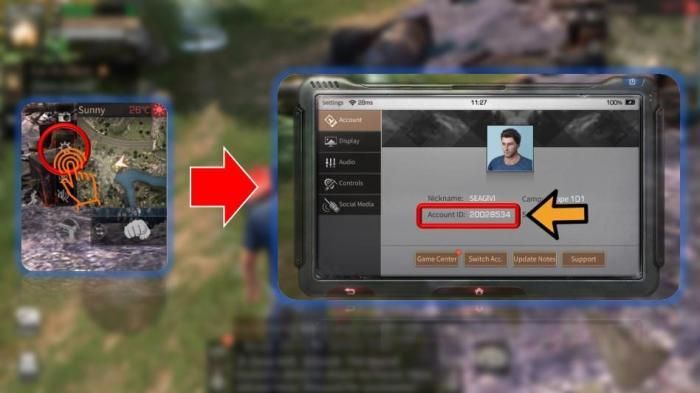
- Load Into the Game World: Launch the LifeAfter application, select your character from the server list, and spawn into the active game map (such as your camp manor or Hope 101).
- Open the Settings Screen: Look at the upper-right corner of your HUD. Tap the gear icon representing System Settings. If you customized your layout, this button might sit elsewhere.
- Identify and Copy Your Account ID: Check the bottom or side panel of the primary Settings tab. Find the line listing "Account ID" followed by an alphanumeric string. Tap the copy icon directly beside this string to store it in your clipboard.
+-------------------------------------------------------------------------+
| [LifeAfter Main HUD]                                     [Gear / Setup] |
|                                                                         |
|   +-----------------------------------------------------------------+   |
|   | SETTINGS WINDOW                                                 |   |
|   |                                                                 |   |
|   | > Basic Settings                                                |   |   |
|   | > Controls & Graphics                                           |   |
|   |                                                                 |   |
|   | Account ID: 1234567890 [Copy Icon]                              |   |
|   | Server: SandCastle                                              |   |
|   +-----------------------------------------------------------------+   |
+-------------------------------------------------------------------------+
This simple string identifies your survivor file across NetEase's databases. Without it, external order processing, custom support tickets, and cross-platform recovery attempts will stall.
Custom HUD Layouts and the Moving Settings Icon
Screen looking empty in the top-right corner?
LifeAfter features deep interface customization. Survivors drag, scale, and reposition HUD buttons to fit custom claw-grip preferences. If you tweaked controls for faster shooting or comfortable gathering, your settings gear will not sit in the factory position. Players using four-finger or six-finger control schemes frequently shift system buttons into transparent clusters or down beside the mini-map to keep sightlines clear during Infected invasions.
Check near your mini-map or inspect your minimised side-drawers. Opening the HUD editor allows you to restore default placements if an element vanished beneath another widget.
The following table outlines standard interface coordinates for essential account navigation elements compared to where survival players typically relocate them.
| Interface Element | Factory Location | Custom Combat Layout Location | Primary Function |
|---|---|---|---|
| Settings Gear | Top-Right Corner | Far Top-Left or Sub-Tray | Account ID access, audio, graphics sliders |
| Character Avatar | Top-Left Corner | Unaltered (Locked Anchor) | Health bar, hunger, infection indicators |
| Chat & Mail Drawer | Center-Left Edge | Lower-Left Margin | System notifications, server compensation cards |
| Server Name Tag | Title Login Screen | Top Center of Load Screen | Server verification for top-ups |
Takeaway: If your settings gear is not sitting in the top-right corner, check your customized HUD layers or reset your UI layout through the control settings to reveal hidden system icons.
Copying Your ID and Managing Mobile Clipboard Buffers
Tapping the copy icon next to your Account ID pushes the text directly into your device clipboard. While LifeAfter supports legacy systems back to Android 4.1, modern operating systems make tracking copied text much easier.
On devices running Android 13 or newer, copying an account number triggers a floating preview card at the bottom of the screen. This popup lets you view and verify the raw string before submitting it to support forms.
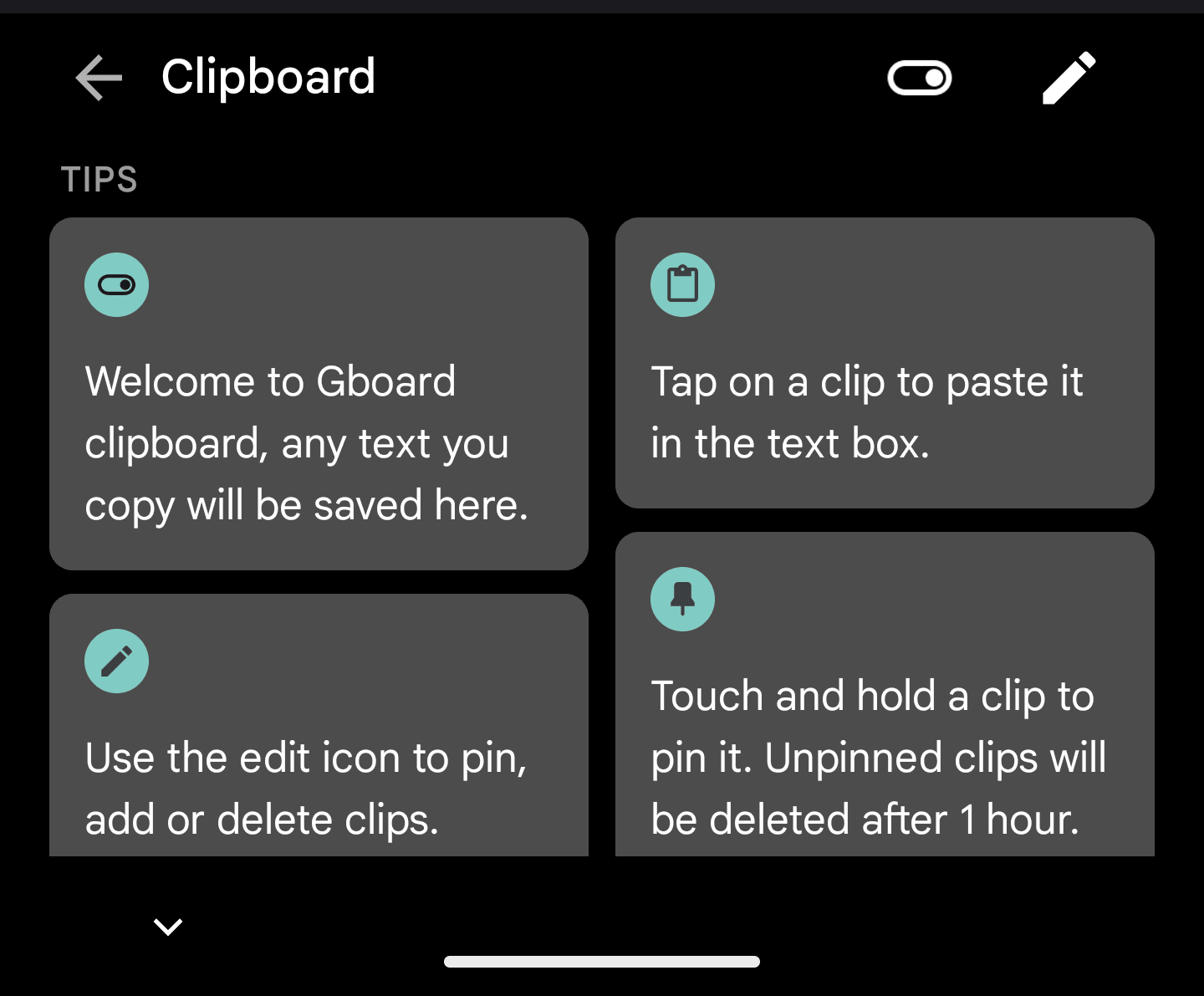
Using a clipboard manager prevents headaches when juggling credentials. Keyboards like Gboard and Microsoft SwiftKey let you pin your Account ID to the top ribbon for fast pasting. On the PC client, Windows clipboard history stores up to 25 items with a 4 MB per-entry ceiling, accessible via Windows Key + V.
Server Merges, Name Suffixes, and Server Verification
Knowing your Account ID is only half the battle. Whenever you file a ticket, bind your login, or order account items, you must provide your active server name. Over the lifespan of LifeAfter, NetEase has merged numerous servers via data-sharing initiatives to maintain healthy camp populations and active trade stalls.
When servers undergo data sharing, characters or camps sharing identical names receive a distinguishing suffix appended to their display name. If your character name gained numbers or symbols after an update, check your in-game mailbox. NetEase distributes a complimentary Rename Card to affected players, allowing you to select an original name without spending premium funds.
Data sharing preserves your original server login entry point while combining world activities. Highway networks retain the longer route between paired servers, and infrastructure leaderboards unite to showcase the combined top 100 players. Following a merge, survivors receive 3 days of Gathering, Crafting, and Combat Mastery bonuses alongside daily online rewards.
The table below details how major server pairs merged, their data-sharing outcomes, and the specific retention rules applied to affected survivors.
| Primary Server | Merged Partner Server | Shared Leaderboard Scope | Post-Merge Player Retention Buffs |
|---|---|---|---|
| SandCastle | NewLand | Top 100 Infrastructure Combined | Distinguishing suffix applied; free Rename Card sent |
| MouthSwamp | MiskaTown | Top 100 Infrastructure Combined | Infrastructure highway merged to longest existing route |
| NancyCity | MileStone | Top 100 Infrastructure Combined | 3-Day Gathering, Crafting, Combat Mastery bonuses |
Takeaway: Server merges change your visible name tag via automatic suffixes, but your underlying Account ID and original server login gateway remain identical.
Always specify your primary server gateway rather than the combined region name when routing orders. If you need to reload premium currency for formula gachas or materials, grabbing your verified server and UID allows you to safely top up LifeAfter Night Falls Credits without delivery delays.
Understanding Character ID Versus Account ID
Display names cause confusion. In LifeAfter, your character name is merely an aesthetic layer. Because server data shares create duplicate names, system databases never rely on display text alone.
Your Account ID is an immutable numerical sequence generated when you create your character data. Even if you purchase a Rename Card or receive one from server merge compensation, your Account ID stays the same. It never changes.
When the Rebirth Day update dropped, the client required roughly 18GB of mobile storage and 60GB on PC prior to installation and resource merging. Despite those sweeping visual and engine modifications, 100 percent of player character progress, levels, backpack inventories, friend lists, and camp memberships carried over intact. The update even waived the standard fee of 1 Credit or Facelift Card for the first saved appearance edit, distributing an extra Facelift Card reward. Throughout all these client shifts, player Account IDs remained untouched.

Why External Delivery Services Require Your UID and Server
LifeAfter features a split economy. While you scavenge wood, stone, and hemp through regular gathering loops, Credits represent the exclusive paid currency in the game. Credits cannot be gathered in the wild or earned through infected combat. They must be purchased directly, serving as the gateway to exclusive gear formulas, rare weapon skins, premium outfits, or conversions into Gold Bars for trade stall transactions.
Legitimate external top-up services use an automated application programming interface (API) to deposit Credits into your account. To complete this deposit, the system requires two data points: your exact Account ID and your server name.
With these details, the system routes resources directly to your character. Because this routing uses public-facing identifiers, you never need to hand over sensitive passwords, Google credentials, or social logins. Once Credits arrive in your balance, they do not expire. You can bank them indefinitely for upcoming formula events.
When securing items for your camp manor or preparing for tough zone bosses, picking up LifeAfter Night Falls credits using your Account ID ensures your funds hit your character without security concerns.
Account Recovery Options When You Cannot Access the HUD
What happens if your phone crashes, your client corrupts, or you install the game on a new device without your Account ID written down? If you cannot reach the settings menu, you cannot read the ID.
NetEase addresses this through a dedicated Recover module built into the main title screen. Before tapping the screen to enter Hope 101 or your manor, look at the right-hand utility column on the login menu. The Recover channel provides four distinct self-service workflows to help stranded survivors reconnect with their lost characters.
The table below details the available recovery channels and the storage criteria needed to keep the modern client operational.
| Recovery Channel | Verification Requirement | Best Used For | Client Resource Footprint |
|---|---|---|---|
| Character Recovery | Known Character Name & Server | Locating missing survivors after server merges | ~18GB on Mobile (Rebirth update) |
| Phone Recovery | Linked Mobile SMS Code | Recovering unlinked guest accounts | Android 4.1+ base requirement |
| Order Recovery | External Store Receipt / Transaction ID | Locating accounts via recent Credit purchases | ~60GB on PC pre-merge package |
| Email Recovery | Registered Email Verification Code | Standard NetEase passport retrieval | Varies by accumulated visual assets |
Takeaway: If you lose your login credentials, use the title screen's Order Recovery or Character Recovery tools to locate your profile without needing your Account ID upfront.
Order Recovery is exceptionally reliable. If you previously made an in-game purchase, the transaction ID on your digital receipt links directly to your character's profile in NetEase's ledger. Once recovered, record your Account ID in a secure note so you do not repeat the process.
Common Mistakes When Recording Your Character Data
Even veteran camp leaders make simple errors when transmitting identification data. Players frequently miss out on event distributions or delay top-up orders for hours because of minor typos.
The most frequent error is confusing a 0 (zero) with an O (capital letter o). In LifeAfter, standard Account IDs are strictly numerical sequences. If you see a character resembling an "O" inside your settings window, it is a zero. Always use the built-in copy button beside the text string rather than writing down the numbers by hand.
The second common pitfall is listing the wrong server. If you started playing on SandCastle but your server was merged with NewLand, you must select the original server gateway you click during login. Entering the wrong server will cause routing systems to return a "User Does Not Exist" error.
Finally, check your client region. LifeAfter operates multiple regional clients across the globe, including the standard global client and the Night Falls edition tailored for European regions. An Account ID generated on a Night Falls server does not exist on global servers. When buying packs or working with support, ensure your client version matches your purchase. If you play on the European client, make sure to recharge LifeAfter Credits EU specifically for Night Falls to prevent invalid transaction errors.
FAQ
Where can I find my Account ID in LifeAfter mobile?
Open the game, log into your survivor, and tap the Settings gear icon located in the top-right corner of the HUD. Your unique numerical Account ID is displayed near the bottom of the Basic Settings tab alongside a copy icon.
Can other players steal my account if I share my Account ID?
No, sharing your Account ID will not compromise your account security. It acts as a public identifier used for top-ups, customer support inquiries, and adding friends, but it cannot be used to log in without your authentication credentials.
Where do I check my current server name?
Your server name appears prominently on the opening title screen before you tap to enter the game world. You can also view your active server connection in your account settings.
What should I do if numbers were added to my character name after a merge?
Check your in-game mailbox to collect the free Rename Card distributed by the system. Suffixes are automatically appended to duplicate names during server merges, and the card allows you to establish a new name free of charge.
How do I recover my LifeAfter account if I lost my login details?
Tap the Recover button on the right-hand menu bar of the main login screen. Choose between Character Recovery, Phone Recovery, Order Recovery, or Email Recovery to locate and reconnect your account.
Do LifeAfter Credits expire after topping up?
No, LifeAfter Credits remain in your balance permanently until you spend them. You can stockpile them across updates for promotional gacha formulas, cosmetics, or Gold Bar exchanges.
How do I quickly paste my Account ID on an Android phone?
Open your virtual keyboard, tap the clipboard icon on the top toolbar, and select your Account ID from your clipboard history. On Android 13 or newer, you can also tap the floating preview overlay immediately after copying the ID.
Keep That UID Handy
Your LifeAfter Account ID is your survivor's true digital fingerprint. Whether your camp is holding down MouthSwamp or fighting through high-tier Infected zones, keep this numerical ID recorded outside the game. Take a screenshot of your Settings screen, pin the string inside your mobile clipboard, and double-check your server name. Having those digits ready saves time and ensures your character data remains secure through every server merge and visual update NetEase rolls out.

Community
Comments