

Learn the cheapest way to add funds to Thai PSN account in 2026. Bypass bank checkout errors, skip foreign fees, and calculate real wallet savings today.
Setting up a PlayStation Network profile tied to Thailand is one of the smartest moves an international gamer can make. Regional pricing across Southeast Asia frequently undercuts Western digital storefronts on major launches, expansion passes, and indie titles. The problem starts at checkout.
Sony enforces an uncompromising regional billing policy: if your payment card was issued outside Thailand, the console store drops your purchase immediately. Even if an international card sneaks through, cross-border banking fees eat away the regional discount.
Adding funds cheaply is not about finding risky gray-market loopholes. It comes down to eliminating bank markups, avoiding bad currency conversion rates, and using verified digital prepaid cards.

PlayStation Network Card (TH)
Why Buying Directly from the Thai PS Store Costs You More
Paying Sony directly with a card looks simple, but it rarely works for international users. PlayStation Store requires your payment method's billing address and issuing country to match the account's region. Overseas cards fail verification instantly.
Forcing transactions through triggers automated fraud blocks. Submitting a declined card repeatedly slaps your account with a 1- to 2-hour cooldown. Retrying four times in a row locks your payment screen for the evening.
Failed attempts also create phantom charges. Banks hold funds under temporary pre-authorization holds. These holds lock up cash for 1 to 8 business days without adding a single Thai Baht (THB) to your PSN wallet.
Third-party mobile wallets offer no workaround. Credit cards routed through regional digital apps still hit address verification checks and return the same flat rejection.

The Hidden Bank Markup: Credit Card Fees and DCC Traps
Whenever an international card does clear a foreign checkout, banking surcharges quietly inflate your receipt.
Card issuers charge foreign transaction fees between 1% and 3% on overseas purchases. Thai payment processors add their own layer: online processing averages 1.5% to 3.5% per charge, plus currency conversion fees around 1% (roughly 10 THB per 1,000 THB spent).
Then comes Dynamic Currency Conversion (DCC). If the checkout terminal or screen asks whether you want to pay in your home currency instead of THB, always decline. DCC allows third-party payment processors to apply custom exchange rates, routinely running 4% to 7% worse than mid-market rates.
| Checkout Channel | Actual FX Markup & Surcharges | Practical Transaction Note |
|---|---|---|
| Direct Credit/Debit Card Checkout | 1%–3% foreign exchange markup + potential DCC fee | Requires matching Thai billing address; international cards are routinely declined by Sony's gateway. |
| Authorized Thai PSN Gift Card Code | 0% foreign transaction markup on console checkout | Code delivers instant 12-character redemption; skips 3D Secure protocols and cross-border bank checks. |
| Secondary Gray Market Key Reseller | Variable pricing (often advertised below face value) | Carries high risk of mislabeled regional stock, fraudulent original payment, or immediate redemption errors. |
Digital voucher codes bypass these checkout markups completely because Sony processes them as local store credit, not international card transactions.
Resolving the Region Lock Barrier and Error E-82000134
PSN accounts are locked to the country set during registration. Sony does not permit region migration, and support agents will not override the rule.
Gift cards carry the same strict boundary. If you try to redeem a US Dollar, British Pound, or Euro code on a Thai PSN account, the console halts the transaction with error E-82000134. That error code specifically indicates an account and currency mismatch.
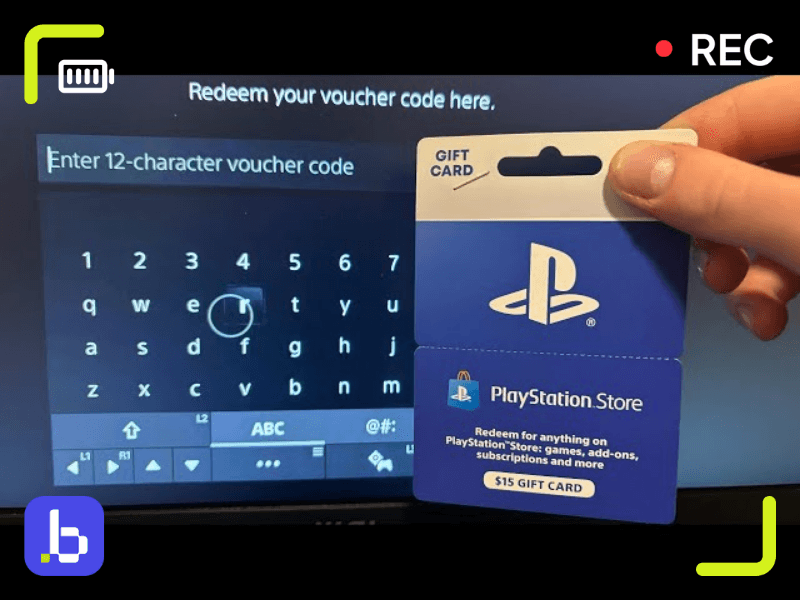
To fund your balance without regional errors, pick up a PlayStation Network Card (TH) issued in Thai Baht. A genuine TH code uses a 12-character sequence that skips 3D Secure SMS checks, bank fraud algorithms, and billing address forms entirely. Enter the code on your console or through a browser, and the funds credit your Thai wallet balance instantly.
Sony's payment engine also prioritizes existing wallet credit: it drains your wallet balance first before charging any secondary card on file. Pre-funding your account keeps your bank card off Sony's billing system and prevents unexpected foreign transaction fees.
Calculating the Per-Baht Value of Digital THB Vouchers
Minimizing your cost per Baht is pure math. Buying small top-up codes repeatedly exposes you to multiple baseline gateway fees and payment processing minimums.
Thai PSN cards sell across several standard denominations. Topping up with small amounts for individual microtransactions is the most expensive way to buy credit; higher denominations yield more purchasing power per dollar spent against merchant handling fees.
| THB Denomination Pack | Typical Use Case & Target Buyer | Per-Baht Efficiency Assessment |
|---|---|---|
| 300 THB | Battle passes, microtransactions, or topping up an uneven wallet balance. | Highest effective processing cost per Baht; poor value for full-game purchases. |
| 500 THB | Mid-tier indie titles, game expansion passes, or seasonal sale bargains. | Moderate efficiency; practical for targeted single-title acquisitions. |
| 1,000 THB | Standard modern releases during promotional discount periods. | Strong per-Baht value; covers most discounted AAA base editions. |
| 1,500 THB – 2,000 THB | Pre-orders, premium deluxe game editions, or annual subscription tiers. | Lowest overhead per Baht; ideal baseline for building a long-term promotional war chest. |
Grabbing a larger PlayStation Network Card (TH) avoids repeated processing overhead throughout the year.
Digital wallet funds never expire. You can load a 2,000 THB card during a lull in releases, hold the balance safely, and spend it when Golden Week, Days of Play, or publisher sales go live.
Managing PlayStation Plus Deluxe and Subscription Conversions in 2026
PlayStation Plus operates differently in Southeast Asia. Because Sony does not maintain cloud streaming infrastructure in Thailand, the top subscription tier is PlayStation Plus Deluxe rather than Premium. Deluxe replaces cloud streaming with downloadable Classics and time-limited game trials, sold at a lower regional price point.
Extending or upgrading membership via vouchers follows Sony's regional conversion matrix. When you redeem an existing subscription voucher onto an active membership tier, Sony calculates duration based on equivalent value.
| Voucher Duration | Essential Tier Credit | Extra Tier Credit | Deluxe Tier Credit | | :--- | :--- | :--- | | 1-Month Voucher | 31 Days | 21 Days | 18 Days | | 3-Month Voucher | 92 Days | 56 Days | 49 Days | | 12-Month Voucher | 365 Days | 219 Days | 190 Days |
These day counts are exact. Redeeming a standard 12-month voucher on an active Deluxe tier yields 190 days of Deluxe access, not 365 days.
Catalog offerings also changed at the start of 2026. Sony made PS4 additions to the PlayStation Plus library intermittent while focusing steady monthly drops on PS5 software. Factor this release pacing into your budget before deciding between a long-term subscription or direct game purchases.

Legacy Systems and the End of Auto-Add Funds
Sony altered wallet behavior by permanently eliminating the "Auto-Add Funds" toggle on September 12. Consoles no longer automatically bill a stored card when an active pre-order or subscription renewal runs short of wallet funds.
If your THB wallet lacks the required amount on a renewal date, the charge fails outright unless you maintain a valid, regionally matching secondary card. For foreign users holding Thai accounts, manual wallet pre-funding is the only reliable way to keep subscriptions active.
Manual funding is equally critical on legacy hardware. Direct credit card and debit card checkout is discontinued on PS3 and PS Vita digital stores. You cannot enter payment card details on those consoles.
To purchase PS3 or PS Vita titles from the Thai store, redeem a PlayStation Network Card (TH) via a PS5, PS4, or web browser. Once added, the funds appear in the unified THB wallet shared across your legacy hardware.
Spotting Fake Sellers and Securing Genuine Thai Voucher Codes
Cheap keys on unverified digital marketplaces carry serious risk. Gray-market platforms frequently host third-party merchants selling codes sourced through stolen credit cards.
When a defrauded cardholder issues a chargeback, Sony traces the redeemed key directly to the account that activated it. Sony's automated security response suspends the console and account until the disputed balance is settled. Saving a few Baht on an unauthorized board is not worth losing a primary account.
Gray-market listings also frequently confuse Southeast Asian regional stock. Sellers post regional vouchers pegged to Singapore, Malaysia, or Hong Kong under general Asian tags. Once the digital scratch layer or code is revealed, these sellers rarely honor refunds, leaving you with code E-82000134 and an unredeemable voucher.
Stick to verified digital distributors delivering direct Sony Interactive Entertainment codes. You avoid fraud flags, dodge currency conversion surcharges, and receive clean 12-character vouchers that redeem immediately.
Step-by-Step: Adding Funds to Your Thai Wallet Without Rejection
Redeeming prepaid THB cards bypasses all card security gateways. Follow these steps to apply funds on console or web:
- Sign in to your Thailand-registered PSN profile. Confirm that store prices display in THB.
- On PS5, open Settings, select Users and Accounts, and choose Account.
- Open Payment and Subscriptions, then click Redeem Code.
- Enter the 12-character voucher code without hyphens or spaces.
- Confirm the selection. The Baht value deposits into your wallet balance immediately.
On a desktop browser, log in to the official PlayStation Store site, click your profile icon in the top-right corner, select Redeem Code, and submit the 12 characters. The wallet balance updates across linked PS5, PS4, PS3, and PS Vita systems instantly.
Frequently Asked Questions
Why is my credit card declined on the Thai PlayStation Store?
PlayStation requires your payment card's billing address and issuing country to match the account's registered region. Overseas cards fail verification checks. Multiple failed attempts trigger a 1- to 2-hour account security cooldown.
Can I change my existing PSN account region to avoid currency surcharges?
No. PSN regions are locked upon creation. Sony provides no mechanism to transfer accounts between countries or change storefront currency. You must create a dedicated Thai profile.
What happens if I redeem a gift card from another country on a Thai PSN account?
The console rejects the code and shows error E-82000134. Vouchers are strictly region-locked and do not convert across currencies. You must use a voucher issued in Thai Baht (THB).
Do Thai PSN wallet gift card codes expire?
Unredeemed voucher codes and deposited wallet balances do not expire. You can redeem vouchers immediately or hold funds across seasonal sales without losing your balance.
How do wallet funds work during PlayStation Store purchases?
The checkout system prioritizes wallet funds. Sony deducts the full purchase price from your wallet balance first before attempting to bill any secondary payment method.
Which PlayStation Plus tiers are available for Thai PSN accounts?
Thailand offers Essential, Extra, and Deluxe tiers. Deluxe replaces the Premium tier because cloud streaming is not supported locally. It includes downloadable Classics Catalog games and time-limited trials.
How long should I wait if my card was repeatedly declined on PSN?
Stop submitting payments and wait at least 1 to 2 hours. Entering card details during the security cooldown resets and extends the lockout window.
The Smartest Path to Thai PSN Credit
Running foreign credit cards through the Thai PlayStation Store creates unnecessary headaches: pre-authorization holds, billing errors, and 2-hour checkout lockouts. Bank conversion spreads and foreign transaction fees quickly erase regional price advantages.
Prepaid Thai vouchers solve the problem cleanly. Buying 1,000 THB or 2,000 THB cards from a trusted digital seller sidesteps error E-82000134, avoids foreign transaction fees, and protects your account. Keep your wallet pre-funded and spend your time playing games instead of troubleshooting checkout errors.

Community
Comments