

Learn how to spend remaining balance on China Apple ID accounts to reach 0.00 CNY, forfeit trapped credit, and safely switch your App Store back home.

iTunes Gift Card (CN)
How to Clear Residual CNY Credit Down to Zero
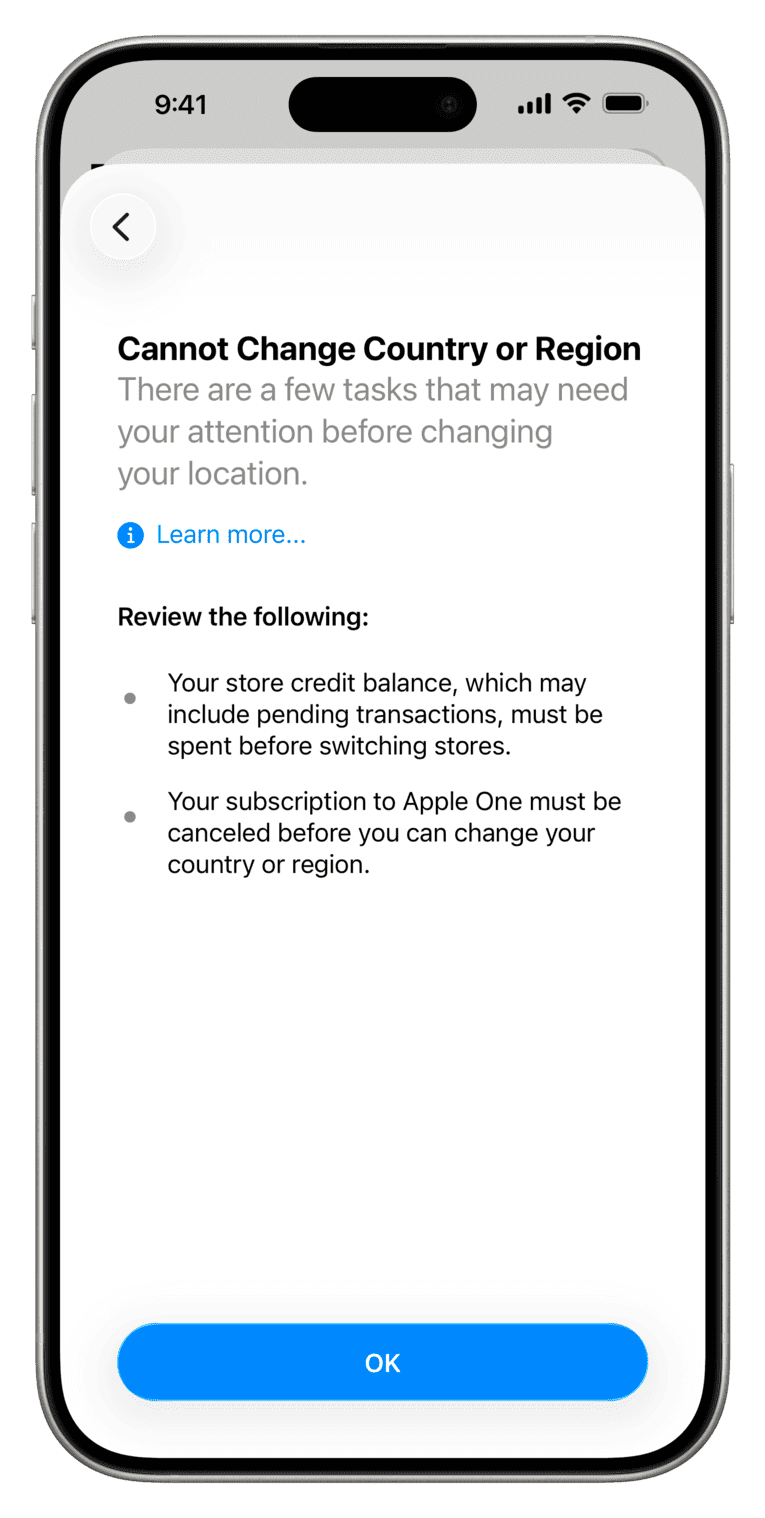
Switching an Apple ID out of Mainland China requires an exact 0.00 CNY balance. Apple applies this check across every regional storefront. Even 0.01 CNY stops the migration immediately: iOS displays a hard prompt requiring you to spend all funds before changing territories.
You have three ways to zero out the account:
- Purchase standalone digital media: Buy a single song, ringtone, budget utility app, or consumable in-app purchase if the balance covers it. Subscriptions and pre-orders must be avoided because recurring billing periods trigger separate transfer blocks.
- Pay the exact difference with a secondary payment method: Add a domestic Chinese payment method to fund the gap on a larger purchase. Apple drains your store credit first and charges the remaining balance to the linked instrument, leaving the wallet at zero.
- Request a balance waiver from Apple Support: If your credit is lower than the lowest-priced item in the store (like 0.30 CNY), normal spending is impossible. Contact Apple Support and ask the advisor to manually forfeit the remaining balance server-side.
To avoid trapped funds on future purchases, align your balance directly with item prices using an iTunes Gift Card (CN).
Why Apple Traps Store Credit at Region Switch
Tax jurisdictions, currency restrictions, and domestic corporate entities prevent Apple from moving wallet balances between countries. Yuan credit cannot be converted to USD, EUR, or GBP, nor can an account transfer carry domestic liabilities into a foreign Apple subsidiary.
Unspent credit remains an active cash liability for Apple's local Chinese corporate entity. The store profile stays locked to that entity until the liability clears.
Different gaming storefronts enforce contrasting policies for region-bound wallet funds:
| Platform | Zero Balance Enforced for Region Switch | Minimum Balance Handling | Region Switch Lockout / Latency |
|---|---|---|---|
| Apple App Store | Yes (Exact 0.00 required) | Must contact support to forfeit balance lower than item cost | Immediate once requirements are satisfied |
| Google Play | No (Balances stay bound to country profile) | Credit remains locked to original country profile | Enforces a 90-day cooldown and up to 48 hours profile update latency |
| Nintendo eShop (America) | Yes (Exact 0 balance required) | Must spend entire balance down to zero | Immediate once wallet reads zero |
| Nintendo eShop (Europe) | Partial (Balance surrender allowed) | User can voluntarily forfeit remaining funds in menu | Immediate once user confirms balance surrender |
Takeaway: Unlike European Nintendo accounts, which allow instant user-directed balance surrendering, Apple requires either precise micro-spending or direct administrative support intervention to eliminate trapped CNY.
Clearing Balance via Standalone Purchases
If your remaining balance exceeds the lowest price tier on the App Store, purchasing standalone content is the fastest resolution. The selected item must settle instantly without creating ongoing renewals.
Buy Individual Media Instead of Subscriptions
Avoid free trials or ongoing app subscriptions to clear credit. Active subscriptions block regional migration until their full billing period ends, even if the balance sits at 0.00 CNY. Choose one-time media instead:
- Individual tracks on the iTunes Store
- Ringtones or alert sounds
- Budget paid utilities or indie games
- Standalone e-books
- One-time consumable in-game items
Chinese gift cards use a 16-digit alphanumeric code starting with X and lock directly to the China storefront upon redemption. They cannot be transferred between users. If you have 6 CNY left over, filter store categories for a standalone utility or song priced at exactly 6 CNY.
Clearing Balance by Paying the Difference
If you have 3 CNY in store credit and select a 6 CNY song, Apple splits the charge if you link a valid domestic payment method. Checkout consumes the 3 CNY store balance first, then bills the remaining 3 CNY to the linked payment instrument.
Your store balance drops to 0.00 CNY the moment the transaction settles. You can then unlink the secondary payment method and proceed with the country change. Without a domestic Chinese payment method, this route is blocked, making Apple Support the remaining choice.
Forfeiting Sub-Yuan Balances Through Apple Support
Redeeming fixed-value cards often leaves awkward remnants like 0.40 CNY or 1.20 CNY. Since no App Store items sell at those fractional tiers, you cannot spend down to zero without adding more funds.
Apple's internal policy permits account advisors to clear trapped sub-item balances upon user request. You must explicitly authorize the representative to wipe the remaining change.
The appropriate action depends on how much credit remains in the account:
| Residual Balance Tier | Recommended Action | Requirements / Documentation | Resulting Balance |
|---|---|---|---|
| Balance > Lowest Store Item | Buy standalone paid media (song/app) | Store browsing, no subscriptions | Exactly 0.00 CNY |
| Near Cost of Specific Item | Pay difference using secondary payment | Domestic payment method linked | Exactly 0.00 CNY |
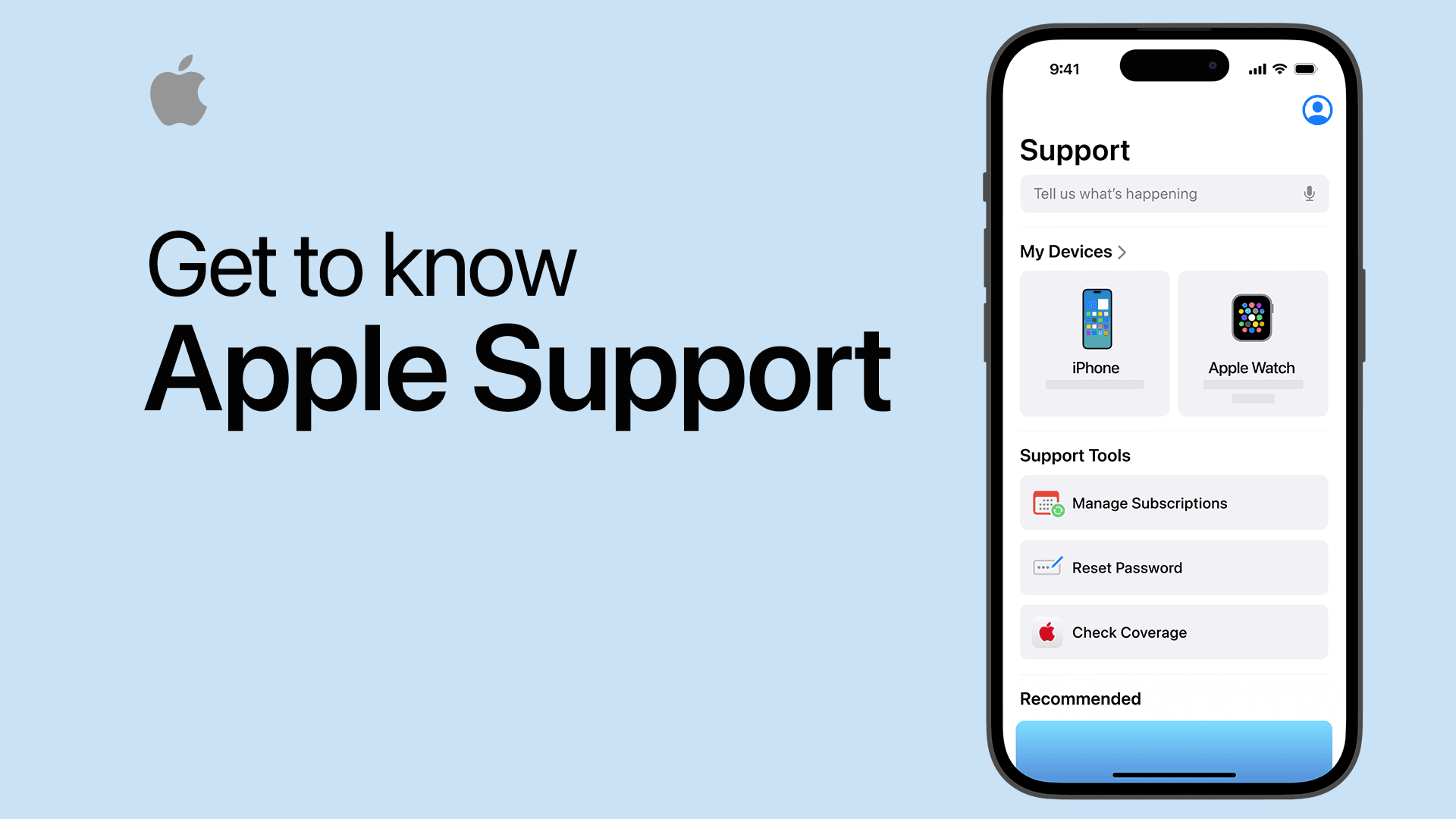
| Balance < Lowest Store Item | Contact Apple Support for manual forfeiture | Contact via Apple Support app or official phone line | Forfeited to 0.00 CNY |
| Indivisible Odd Credit | Maintain dual-ID structure | Secondary Apple ID setup on device | CNY preserved on dedicated ID |
Takeaway: Forfeiture via customer support is the standard administrative tool provided by Apple for handling sub-unit credit traps.
Contacting Mainland China Apple Support
Support requests can be handled by phone or text. Within Mainland China, dial 400-666-8800. From outside the country, access support through the Apple Support app or the regional web portal:
- Sign in with the China Apple ID that holds the trapped funds.
- Go to Billing & Subscriptions, then select Subscriptions & Purchases.
- Choose Apple Account Balance or Unable to Change Country or Region.
- Open a live chat or schedule a callback.
- State: "I need to switch my Apple ID country/region. I have a remaining balance of [Exact Amount] CNY, which is less than the cost of any store item. I authorize Apple to forfeit this remaining balance down to zero so I can proceed with the country change."
The advisor validates account ownership through security questions or a two-factor push notification. Once verified, they adjust the wallet credit to 0.00 CNY on the backend. The update applies instantly.
While some consumer laws in select western regions provide cash payouts for small balances, Mainland China gift card credit offers no automated withdrawal channel. Manual forfeiture is the standard path to unlock the region transfer.
Hidden Region Switch Blockers Beyond Store Credit
Zeroing the wallet is mandatory, but other active account states can also halt regional updates. If the store settings reject your update despite a 0.00 CNY balance, check these items:
- Active Subscriptions: Any active subscription halts the region switch interface. You must turn off auto-renewal and wait for the remaining term to expire, unless an advisor cancels the entitlement immediately from the back office.
- Pending Orders and Refunds: Active rentals, open pre-orders, and disputed refund requests freeze store settings until marked completed.
- Family Sharing: Enrolled accounts cannot change their regional settings alone. Leave the Family Sharing group before attempting the switch.
- Missing "None" Option: Selecting "None" avoids adding local foreign payment methods during setup. Apple hides this option if the account carries past-due bills, chargebacks, or unresolved store obligations.
Cancel ongoing services before requesting balance forfeiture. Otherwise, you will forfeit credit only to wait weeks for remaining subscription cycles to end.
The VPN Fallacy and Cross-Border Storefront Mechanics
Routing network traffic through a VPN does not bypass Apple ID balance requirements or alter regional storefront settings.
VPN software changes your public IP address. It has no effect on account records. Available store catalogs, catalog currencies, and wallet balances correspond strictly to the country assigned to your Apple profile on Apple's database.
A phone in the United States using a domestic carrier loads the Chinese App Store if signed into a China-registered Apple ID. Conversely, a device routing through a Shanghai IP address cannot access Chinese pricing or apps with an American Apple ID.
Account databases dictate access, not network endpoints. Changing your store requires changing account attributes under Apple's rules.
The Dual Apple ID Workaround
Shifting one Apple ID back and forth across regions causes friction. Each transfer risks stranded balances, delays from active services, and broken cloud synchronization.
Decoupling your main iCloud account from your store downloads resolves the problem. iOS natively supports running one Apple ID for system data (iCloud, Photos, Contacts) and an entirely different Apple ID for store content (Media & Purchases).
If you need recurring access to regional releases, keeping a dedicated profile funded with a verified iTunes Gift Card (CN) bypasses the issue entirely. You avoid balance zeroing because the account never switches regions.
| Setting / Function | Single Account (Constant Region Switching) | Dual Account Setup (iCloud + Media & Purchases) |
|---|---|---|
| Account Balance Management | Must spend/forfeit down to 0.00 CNY every time | Residual CNY safely remains in wallet for future use |
| App Update Delivery | Apps from previous region stop updating cleanly | Both sets of apps update by switching storefront session |
| Cloud Data Safety | Risk of interrupting regional iCloud sync | Primary iCloud data stays anchored to home region |
| In-App Purchase Restorations | Purchases tied to changing regional profiles | Purchases stay locked to their originating account |
| Setup Overhead | Ongoing support tickets and manual spending | One-time creation requiring domestic phone verification |
Takeaway: Operating a dedicated secondary account for China App Store access protects your primary iCloud profile and prevents repeated balance forfeiture requests.
Setting Up a Media & Purchases Profile
Configure separate profiles on one device:
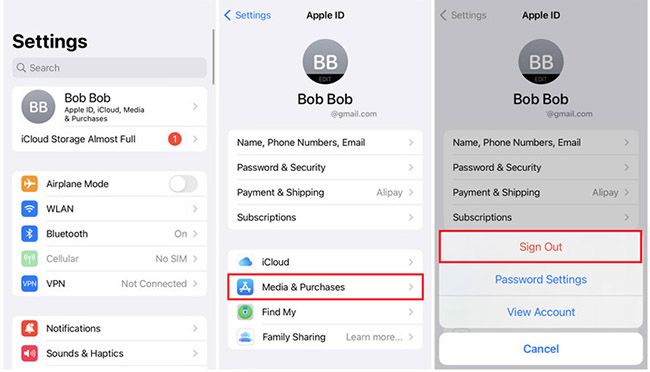
- Sign your primary home account into the main device profile (Settings > [Your Name]).
- Tap Settings > [Your Name] > Media & Purchases.
- Tap Sign Out to disconnect only App Store media services while keeping iCloud active.
- Select Media & Purchases again and tap Not [Your Name]? to log in with your China Apple ID.
- Apply an iTunes Gift Card (CN) top-up directly to this alternate account for purchases.
Creating a China Apple ID from scratch requires SMS verification from a Chinese mobile number, such as China Mobile or China Unicom. Note that in-app purchases cannot move between accounts; items stay tied to the ID used at checkout.
Switch back to your primary market anytime by signing out of Media & Purchases and logging into your standard ID. All installed applications remain on the phone.
Apps sourced from the alternate profile continue to open normally. When an update arrives, iOS prompts for that China Apple ID's password or allows you to sign back into Media & Purchases briefly to complete the download.
Frequently Asked Questions
Why does my China Apple ID block me from changing regions?
Apple strictly requires your account balance to read exactly 0.00 CNY before updating your country or region. Any remaining store credit, active subscriptions, or incomplete orders will halt the process server-side.
What should I do if my remaining CNY balance is too small to buy anything?
You must contact Apple Support and request that an advisor manually forfeit your residual balance. Once support wipes the trapped balance down to zero, you can change your region immediately.
Can I use a VPN to bypass the balance requirement and change store regions?
No. A VPN only changes your visible IP address and has zero impact on your App Store billing rules. Storefront availability is locked directly to your Apple ID account profile on Apple's servers.
What happens to the Chinese games I downloaded after I switch back?
Downloaded games remain installed on your device and will generally function without issue. However, they will no longer update automatically and cannot be re-downloaded if deleted unless you switch back or log into that storefront.
Can I transfer leftover China App Store credit to another region?
No. Apple Account credit is strictly non-transferable between different regions, accounts, or currencies. Balances must be spent, administratively forfeited, or left on the domestic account.
Is it better to change my Apple ID region or create a separate secondary account?
Creating a separate secondary China Apple ID for Media & Purchases is far safer than repeatedly swapping regions. This method protects your primary account's iCloud data, Family Sharing status, and active subscriptions.
Do active subscriptions prevent switching Apple ID regions?
Yes. Active subscriptions block region changes until their billing period fully concludes. You must cancel the auto-renewal and wait out the remaining time before Apple allows you to switch countries.
The Final Verdict on Trapped Yuan
Do not purchase unneeded digital items trying to hit an exact zero balance on odd amounts. Open a support chat with Apple, request a manual forfeiture of the leftover fraction, and complete the region transfer.
Once your primary account returns to your home region, leave it there. Create a secondary China Apple ID dedicated to Media & Purchases and run it via gift cards. That keeps your primary iCloud profile stable and avoids zero-balance delays on future downloads.

Community
Comments